
Updated on 21 September 2026
How to delete a company or a fiscal year in Ubyquo
Learn the requirements and steps to delete companies or fiscal years if you are an administrator user.
In Ubyquo you can delete companies or fiscal years from the Documentos (Documents) tab.
This process is restricted to administrator users, and before deleting a fiscal year or a company you must check that there are no posted documents.
Requirements before deleting
- Only administrator users can delete companies or fiscal years.
- The documents of the fiscal year to be deleted must be in No contabilizado (Not posted) status.
Changing the accounting status of the documents
Before deleting a fiscal year, change the accounting status of the associated documents:
- Go to the Documentos tab.
- Find the documents that belong to the fiscal year you want to delete.
- Right-click the documents.
- Select Cambiar estado contable (Change accounting status).
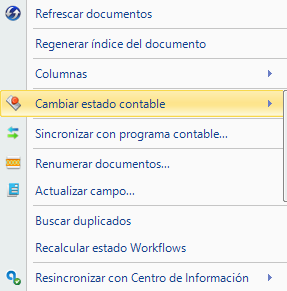
- Select the No contabilizado option.
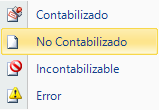
Once the documents are in No contabilizado status, you can continue with the deletion.
Deleting a fiscal year
To delete a specific fiscal year:
- Go to the Documentos tab.
- Position yourself on the fiscal year you want to delete.
- Right-click.
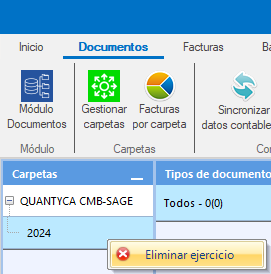
- Select Eliminar ejercicio (Delete fiscal year).
Deleting a company
To delete a whole company:
- Go to the Documentos tab.
- Position yourself on the company you want to delete.
- Right-click.
- Select Eliminar empresa (Delete company).
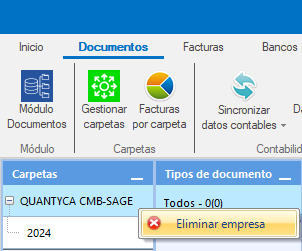
When you delete a company, keep in mind that the action affects the company and all the information associated with it.