
Updated on 21 September 2026
How to back up documents and databases
Protect your documents and databases with regular backups so you can recover them after any incident.
Making regular backups of your Ubyquo data gives you a copy of the stored information and makes it easier to recover it after any incident.
The backup must cover both the stored documents and the Ubyquo databases.
Backing up documents
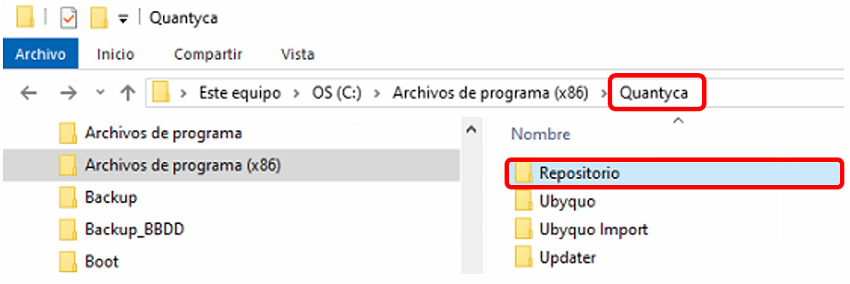
We recommend backing up the entire Quantyca folder, usually located on the server or main computer where Ubyquo is installed.
If it is not possible to copy the entire Quantyca folder, you must at least include the Repositorio (Repository) folder, which is inside Quantyca and contains the documents added to Ubyquo.
Backing up the databases
The Ubyquo databases must also be included in your backup strategy.
Use SQL Server Management Studio (SSMS) to back up the following main databases:
- Ubyquo_XXXXX
- CuentaCliente_XXXXX
Save the backups in a safe location, different from the main server whenever possible.
We also recommend automating the backups and regularly checking that they are being made correctly.
Checking the backups
Setting up a backup is not enough. It is important to check regularly that:
- The backups are being generated correctly.
- The backup files are accessible.
- There is enough space in the destination location.
- The backups are kept for the established period.
Important
Making and keeping backups is the customer's responsibility. Quantyca accepts no responsibility for the backups of its customers' data.
We recommend setting up a backup policy and regularly checking that it works properly.