
Updated on 21 September 2026
How to change or recover your Ubyquo password
Regain access if you have forgotten your password or your user is locked, or change it whenever you want.
If you have forgotten your password, your user is locked or you simply want to change your password, you can do it from Ubyquo and from Administración de la cuenta (Account administration).
Recover a forgotten password or unlock your user
If you do not remember your password or your user is locked, you can request a new password from the login screen.
- On the login screen, click “¿Olvidó su contraseña?” (Forgot your password?).
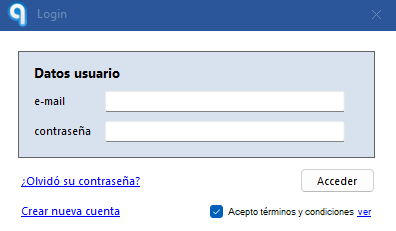
- You will receive an email with a new password.
Once you have it, you can use it to log in to Ubyquo again.
Change your password manually
If you can access your account and want to change your password, follow these steps:
- Go to Inicio > Administración de la cuenta (Home > Account administration). If Administración de la cuenta does not open automatically, you can go straight to it from Administración de la cuenta.
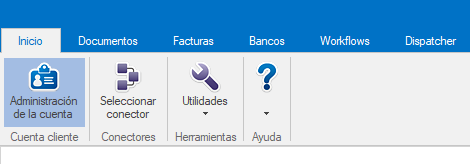
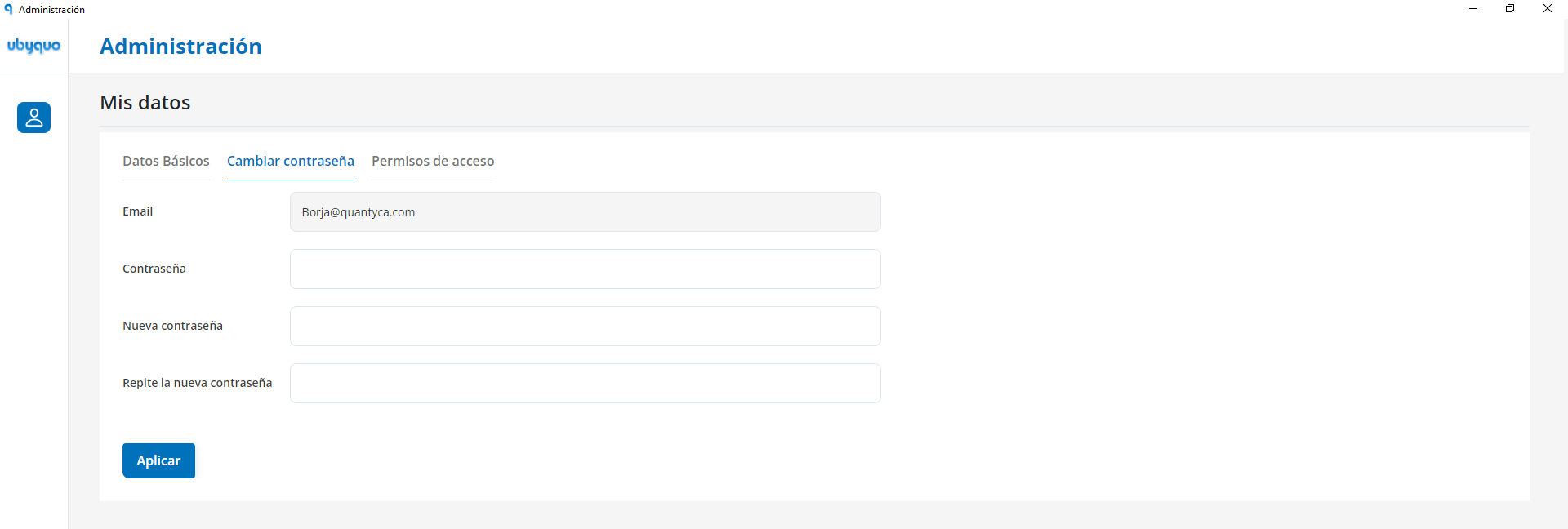
- Select “Mis datos” (My details).
- Click “Cambiar contraseña” (Change password).
- Enter the new password.
Password requirements
The new password must meet the following requirements:
- Be alphanumeric.
- Have a minimum of 8 characters.
- Include uppercase and lowercase letters.
Security recommendations
Use a strong, unique password for your account and do not share it with anyone else.