
Updated on November 26, 2026
Exempt: marking a company as exempt from the Anti-Fraud Law and checking its status
How to mark a company as exempt with its reason for exemption, check its status in Settings and what the Verifactu tab shows.
Mark the company as exempt
- 1
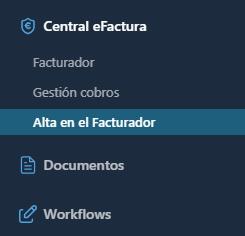
Open «Alta en el Facturador» and find the company
In the side menu, open «Central eFactura» and click «Alta en el Facturador» (Invoicing tool sign-up). The company must be active (with the tick in the «Activa», Active, column).
- 2
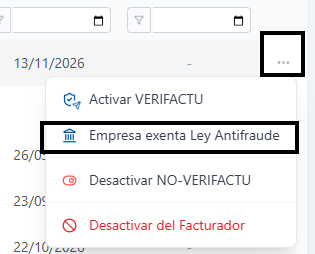
Choose «Empresa exenta Ley Antifraude»
«Empresa exenta Ley Antifraude» (Company exempt from the Anti-Fraud Law), in the options menu of the company's row. The same menu is in Settings › «Datos fiscales» (Tax details), «Ley Antifraude» section, with the tab in edit mode. The «Activación VERIFACTU» (VERIFACTU activation) window opens, with «Aplicación Ley Antifraude» (Anti-Fraud Law application) set to «Empresa exenta VERIFACTU» (VERIFACTU exempt company) and the «Cancelar» (Cancel) and «Guardar» (Save) buttons.
- 3
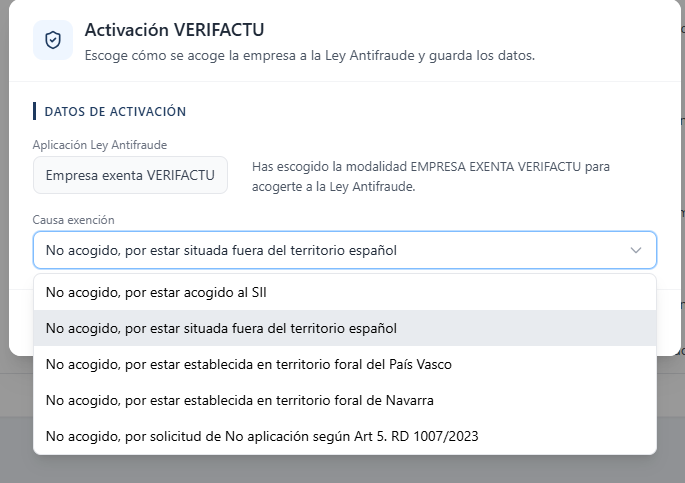
In «Causa exención», choose the reason
In «Causa exención» (Reason for exemption). The reasons are: «No acogido, por estar acogido al SII», «No acogido, por estar situada fuera del territorio español», «No acogido, por estar establecida en territorio foral del País Vasco», «No acogido, por estar establecida en territorio foral de Navarra» y «No acogido, por solicitud de No aplicación según Art 5. RD 1007/2023» (not covered because it is in the SII, because it is located outside Spanish territory, because it is established in the regional territory of the Basque Country or of Navarre, or because of a request for non-application under Art. 5 of RD 1007/2023). Without a reason, «Guardar» is disabled.
- 4
If you choose the request for non-application, type the «Código recibido de la AEAT»
«Código recibido de la AEAT» (Code received from the AEAT). It is the reason «No acogido, por solicitud de No aplicación según Art 5. RD 1007/2023». Without the code, «Guardar» is disabled.
- 5
Click «Guardar»
The message «Datos guardados correctamente.» (Data saved successfully.) appears. To leave without saving, click «Cancelar»: the company's «Modo de uso» (Mode of use) does not change.
- 6
Click «Refrescar» on the toolbar
«Refrescar» (Refresh). The company is shown as «Empresa exenta VERIFACTU», with the detail «Esta opción es la adecuada si la empresa no está sujeta a la Ley Antifraude» (This option is the right one if the company is not subject to the Anti-Fraud Law) and today's date in «Inicio» (Start).

Check the status in Settings
- 1
In the invoicing tool, click the gear icon
You enter Settings. With the company exempt, the header says «VERIFACTU no activo» (VERIFACTU not active).
- 2
Check the «Ley Antifraude» section of «Datos fiscales»
The «Ley Antifraude» (Anti-Fraud Law) section shows «Empresa exenta VERIFACTU», its detail, the «Inicio» date and the reason for exemption.

The Verifactu tab with the exempt company
- 1
In Central eFactura, click the «Verifactu» tab
Next to the tab you see «Modo: Empresa exenta VERIFACTU» (Mode).

- 2
If the «Activación VERIFACTU» window opens, click «Cancelar»
It opens by itself when you enter if the company is Spanish and has no records. With «Cancelar», the company's «Modo de uso» does not change.
- 3
Check the table
No submitted invoice should appear.
What each mode involves: VERIFACTU, NO VERIFACTU and exempt. To remove the exemption: Marking a company as exempt from the Anti-Fraud Law.