
Updated on 9 October 2026
The counterpart shows “Múltiple” (Multiple) when it shouldn't
Fix transactions that show Múltiple: sync, recalculate and review the Banks settings.
Sometimes the Contrapartida (Contra account) column in the Banks module shows Múltiple (Multiple) even though the bank transaction corresponds to a single contra account. To correct it and recalculate the transaction, follow these steps.
Part 1 Sync and recalculate the transaction
- 1
Run a full sync
Run a Sincronización completa (Full sync) of the accounting data.
- 2
Recalculate the transaction
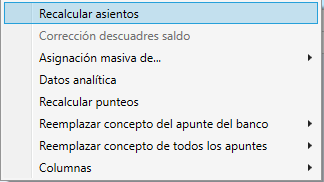
Then recalculate the transaction: select the affected bank transaction and right-click it.
- 3
Check the reconciliation days
Check the reconciliation days to make sure the transaction is reconciled correctly.
Part 2 If nothing changes, review the Banks settings
- 4
Open the settings
Go to Bancos (Banks) › Configuración Bancos (Banks settings).
- 5
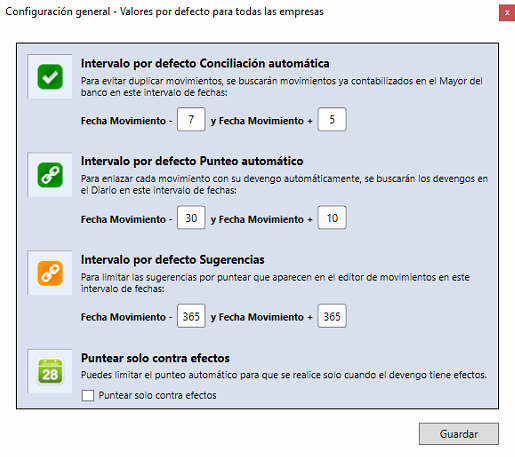
Review the general settings
Review Configuración general (General settings).
- 6
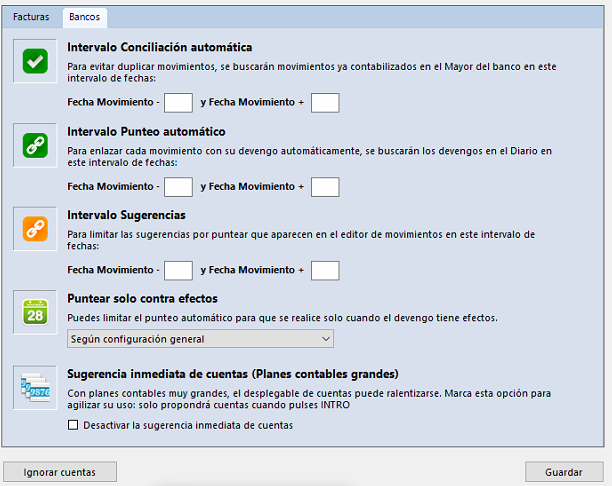
Review the fiscal year settings
Also review Configuración del ejercicio (Fiscal year settings).
- 7
Recalculate again
Once you have reviewed the settings, recalculate the transaction again.
Part 3 If the transaction has already been exported
- 8
Delete it from the accounting software
If the transaction has already been exported, delete it from the ERP or accounting software.
- 9
Recalculate it in Ubyquo
Go back to Ubyquo and recalculate the transaction.
Check the contra account
Check again what Contrapartida shows.