
Updated on September 24, 2026
The counterpart shows “Múltiple” (Multiple) when it shouldn't
Fix transactions that show Múltiple by syncing, recalculating and reviewing the settings.
Sometimes the Contrapartida (Contra account) column in the Banks module may show Múltiple (Multiple) even though the bank transaction corresponds to a single contra account.
To correct this information and recalculate the transaction, follow these steps.
Sync and recalculate the transaction
- Run a Sincronización completa (Full sync) of the accounting data and then recalculate the transaction.
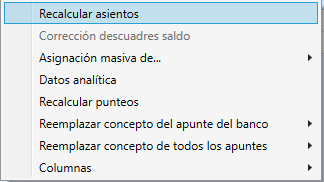
- Select the affected bank transaction and right-click it.
- Check the reconciliation days to make sure the transaction is reconciled correctly.
Review the Banks settings
If the problem persists, review the module settings:
- Go to Bancos (Banks) > Configuración Bancos (Banks settings).
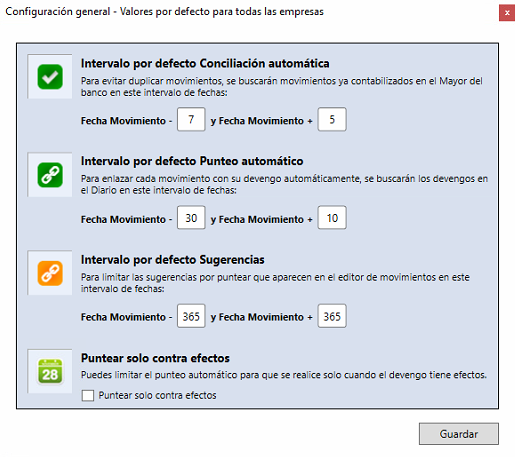
- Review Configuración general (General settings).
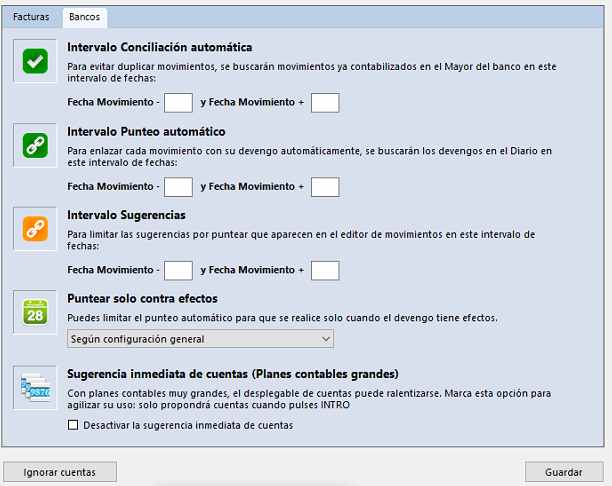
- Also review Configuración del ejercicio (Fiscal year settings).
- Once you have reviewed the settings, recalculate the transaction again.
If the transaction has already been exported
If the bank transaction has already been exported to the ERP or accounting software, you need to:
- Delete the transaction from the ERP or accounting software.
- Go back to Ubyquo.
- Recalculate the transaction.
After completing these steps, check the information shown in Contrapartida again.