Updated on September 24, 2026
How to avoid duplicating transactions already posted in the ERP
Set the automatic reconciliation range so that Ubyquo detects what has already been posted.
Automatic reconciliation lets you identify bank transactions that are already posted in the ERP or accounting software, preventing them from being recorded again.
For Ubyquo to find these transactions correctly, it is important to set the automatic reconciliation range properly.
1
Open the Banks settings
- Go to the Bancos (Banks) tab.
- At the top left, select Configuración Bancos (Banks settings).
2
Set the default range
- Go to Configuración General (General settings).
- In the Intervalo por defecto (Default range) section, select Conciliación automática (Automatic reconciliation).
- Set a suitable date range for the company you are working with.
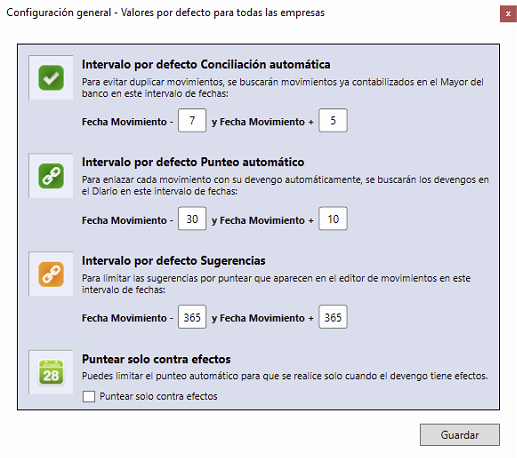
Important: Check that the date range is correct. If the bank transaction falls outside the configured range, Ubyquo may not find it.
3
Set the fiscal year range
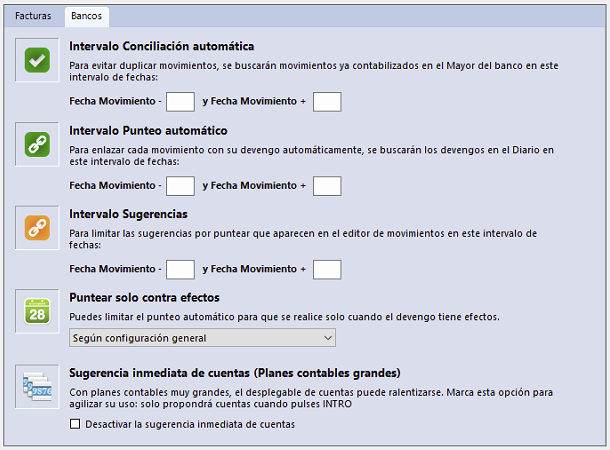
This setting lets you define a specific range for a particular company and fiscal year.
- Go to Configuración del Ejercicio (Fiscal year settings).
- In the Intervalo (Range) section, select Conciliación automática.
- Adjust the date range to the needs of the fiscal year. For example, you can set a specific configuration for 10-day remittances.