
Updated on September 24, 2026
I can't add bank transactions: what to check
What to check when transactions are not being brought in: mismatched balances, duplicate dates and steps.
Why can't I add bank transactions?
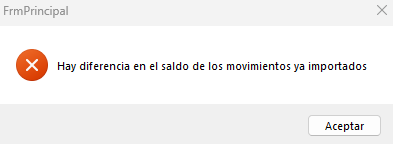
If you can't bring bank transactions into Ubyquo, check that there are no balance mismatches, that there are no transactions with duplicate dates and that you are following the import steps correctly.
Steps and recommendations for bringing in transactions
Check the balance of the transactions
- If the balance does not match, the transactions will not be allowed to be brought in.
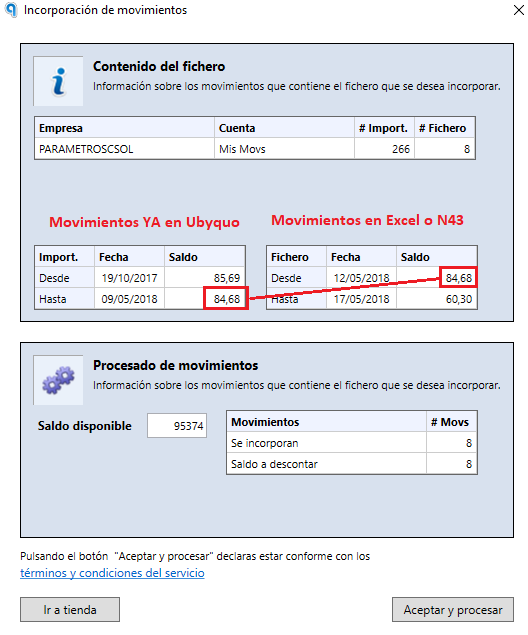
- You can bring in earlier transactions, later transactions or both, as long as the balance matches that of the transactions already imported.
Considerations by account type
- Banks: the balance column is mandatory. Balances must match with no gaps.
- Cash accounts and cards: the balance column is not mandatory, as Ubyquo calculates it automatically.
Check the transaction dates
Transactions with the same date as the last transaction already imported are not allowed.
For example, if the last transaction recorded in Ubyquo is dated 05/05, the next transaction must be dated 06/05 or later.
Avoid duplicate transactions
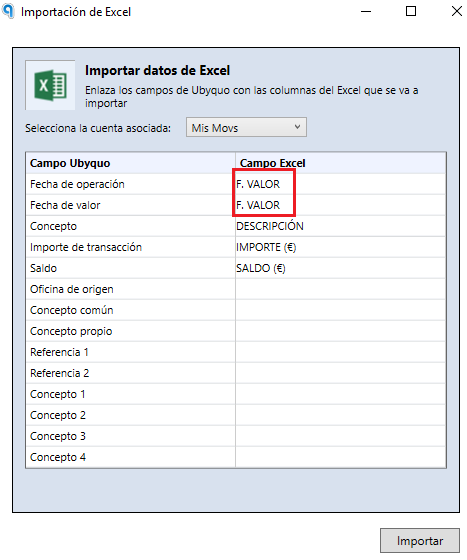
We recommend not duplicating columns during the import, to avoid errors when bringing in transactions.
Balance adjustment transactions
Balance adjustment transactions are transactions that Ubyquo creates automatically when it detects gaps or differences between the balances of the imported transactions.
They are generated when the balance recorded in Ubyquo does not match the balance of the transactions to be brought in.
Recommendation: it is advisable to have at most 1 to 3 mismatches. If more are detected, stop the import and review the transactions before continuing.
Practical example
Imagine that the last transaction brought into Ubyquo has the following data:
| Transaction date in Ubyquo | Amount | Balance in Ubyquo |
|---|---|---|
| 05/05/2024 | €100 | €500 |
Next, you try to bring in an Excel file with the following transactions:
| Transaction date in Excel | Amount | Balance in Excel | Comment |
|---|---|---|---|
| 06/05/2024 | €200 | €700 | It matches, so it is brought in. |
| 07/05/2024 | €300 | €1,500 | It does not match. The balance should be €1,000. |
| 08/05/2024 | €100 | €1,600 | It matches the previous balance. |
In this case, Ubyquo detects a gap in the balance between the transactions of 06/05 and 07/05.
To adjust the difference, Ubyquo automatically creates balance adjustment transactions.