Updated on 24 September 2026
How to activate automatic download of bank transactions
Generate the mandate and submit it at your branch to receive statements without importing them by hand.
Automatic download of bank transactions in Ubyquo is done through Editran and lets you receive bank statements directly in Ubyquo, with no need to bring them in manually.
To activate this service you need to generate a mandate and submit it at the relevant branch.
Create the mandate
To activate automatic download for each bank account, you need to generate a mandate and submit it at the relevant branch.
Important: if the bank does not let you generate the mandate from Ubyquo, it means the bank does not offer the automatic download service through Editran.
Steps to generate the mandate
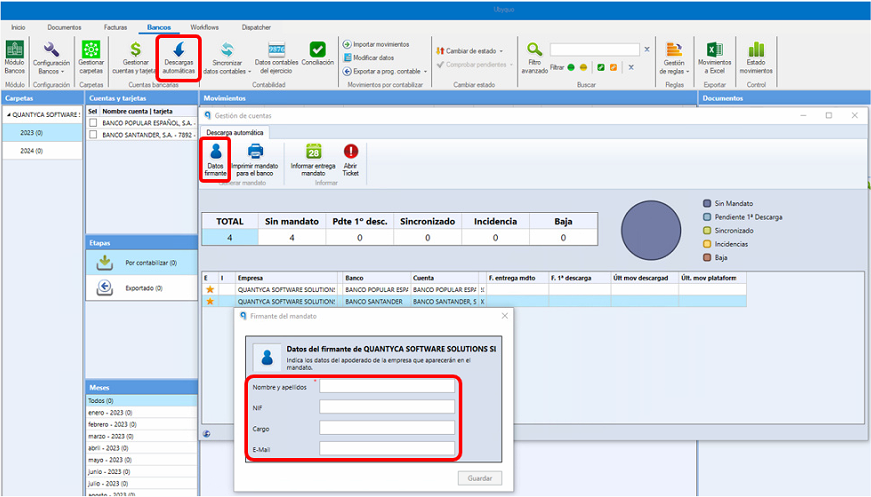
- Go to the Bancos (Banks) module.
- Select the Descargas Automáticas (Automatic downloads) option.
- Select the relevant bank(s).
- Click Datos del firmante (Signatory details).
- Enter the details of the company's attorney or legal representative.
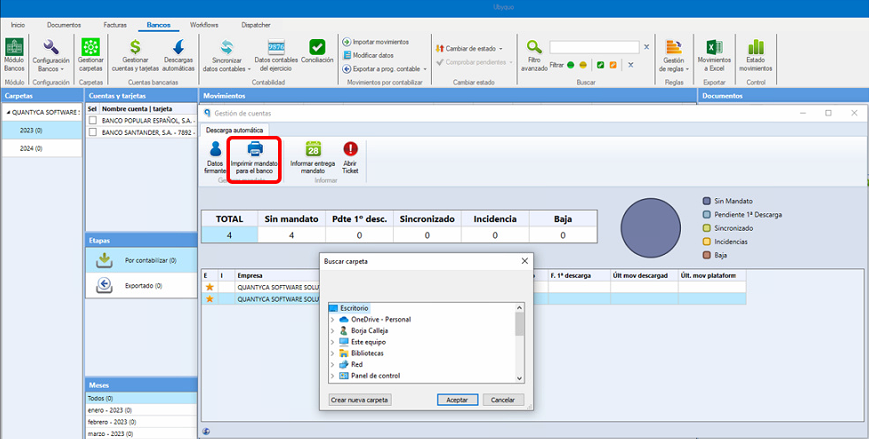
- Click Imprimir mandato para el banco (Print mandate for the bank).
- Save the generated PDF and print it to hand it in at the relevant branch.
image
Confirmation of mandate delivery
It is important to ask the branch for written confirmation that the mandate was received.
The confirmation can be, for example:
- The mandate stamped by the branch.
- An e-mail from the branch confirming receipt of the mandate.
Managing the automatic download
Once the mandate has been delivered to the branch, the activation process can take between 15 and 30 days, depending on the bank.
During this period you can check the activation status from Descargas Automáticas in Ubyquo.
Automatic download indicators
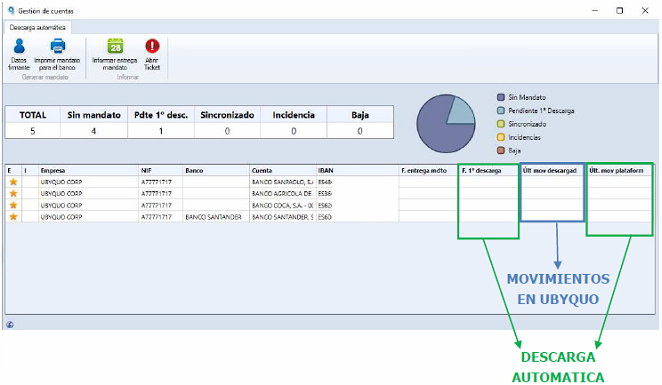
Ubyquo shows the following data:
- F. entrega mdto: (mandate delivery date) the date on which the mandate was delivered to the branch. This date must be entered manually in Ubyquo.
- F. 1ª descarga: (first download date) the date on which Ubyquo first receives a bank transaction through Editran. This date confirms that the mandate has been activated correctly.
- Últ. Mov. descargado: (last transaction downloaded) the date of the last bank transaction downloaded by Ubyquo through Editran.
- Últ. Mov. plataforma: (last transaction on the platform) the date of the last transaction available on Editran to download.