
Updated on September 21, 2026
Ubyquo asks for your user and password when opening ERP documents
Save your credentials to open documents from your ERP without having to type them every time.
If Ubyquo asks for your user and password every time you try to open a document from your ERP or accounting software, you can save your credentials so you don't have to enter them each time.
Remember the user and password
- Open an attached document from your ERP or accounting software, as long as the program allows access to the document from Ubyquo.
- A window will appear asking for your Ubyquo user and password.
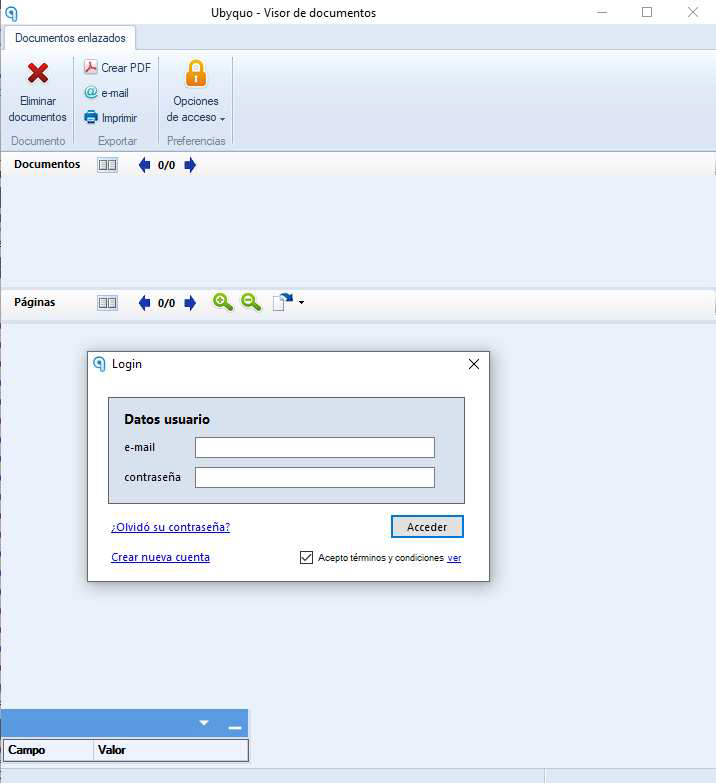
- Enter your credentials and click Opciones de acceso (Access options).
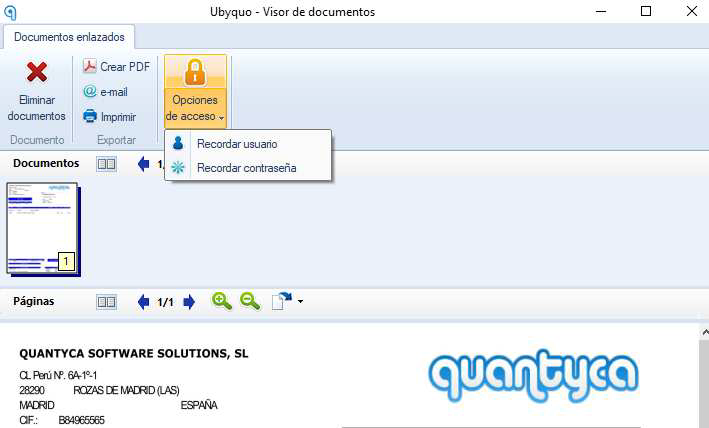
- Check the following options:
- Recordar Usuario (Remember user)
- Recordar Contraseña (Remember password)
- Once both options are selected, continue to access the document.
From then on, Ubyquo will keep your credentials and you won't have to enter your user and password every time you open a document from your ERP or accounting software.