
Updated on 24 September 2026
The F11 key in A3ECO or A3CON does not open the Ubyquo viewer
What to do when UbyquoSync stops responding and the viewer does not open from A3ECO or A3CON.
If pressing F11 on an invoice or a journal entry in A3ECO/A3CON does not open the Ubyquo document viewer, the UbyquoSync service may have stopped responding properly.
This can happen when Ubyquo stays open in the Windows taskbar for more than 24 hours.
To get the viewer working again, follow these steps.
Step 1: Close Ubyquo completely
First, close all Ubyquo sessions.
- Close the Ubyquo program from its main window.
- Look for the Ubyquo Q icon at the bottom right of the screen, next to the Windows clock.
- If it does not appear, click the hidden icons arrow.
- Right-click the Ubyquo icon.
- Select Cerrar (Close) or Salir (Exit).
Make sure Ubyquo has closed completely before continuing.
Step 2: Restart UbyquoSync manually
Once Ubyquo is closed, start the UbyquoSync service manually.
Go to the program's location
- Find the Ubyquo icon on the desktop.

- Right-click the icon.
- Select Abrir ubicación del archivo (Open file location).
Run UbyquoSync.exe
- In the folder that opens, find the file:
UbyquoSync.exe - Double-click the file to run the service manually.
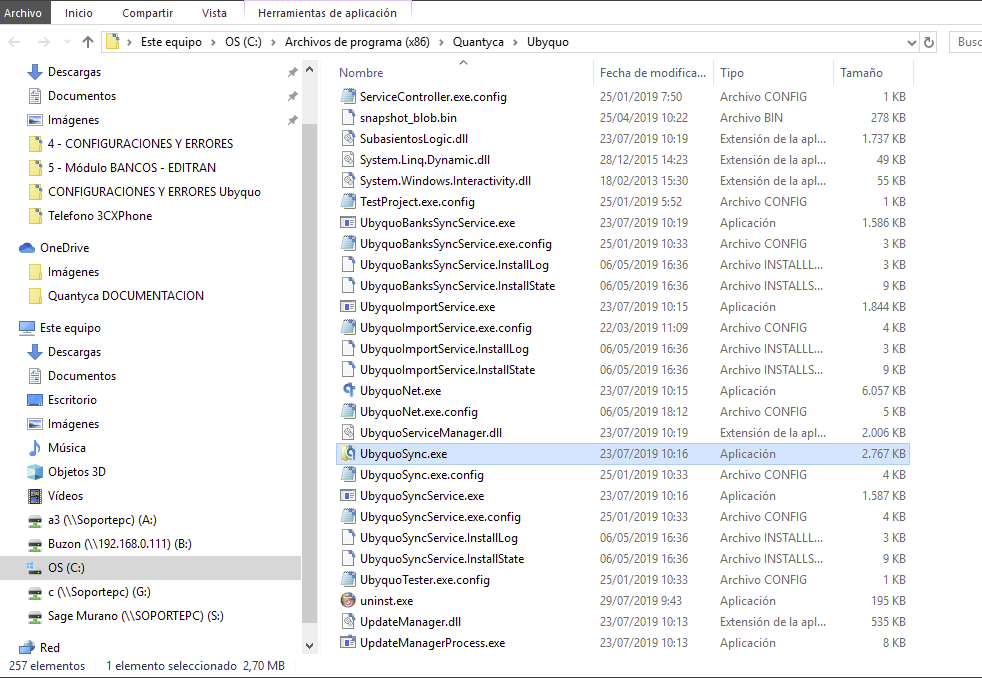
Step 3: Check that F11 works in A3
Once UbyquoSync has started:
- Open A3ECO/A3CON.
- Go to the relevant invoice or journal entry.
- Press the F11 key.
The Ubyquo viewer should open correctly and show the attached document.
If the viewer asks for credentials
If the sign-in window appears:
- Enter your Ubyquo user and password.
- Turn on the Recordar usuario (Remember user) and Recordar contraseña (Remember password) options if you want to avoid entering your credentials in future sessions.
Recommendation if the problem keeps happening
If the F11 key stops working frequently, you can restart UbyquoSync every morning before you start working.
You can also consider setting up a scheduled task in Windows to start the service automatically, as long as it suits your computer's configuration.
If the viewer still does not open after following these steps, the connection between A3 and Ubyquo will need to be reviewed.