
Updated on 24 September 2026
Connecting Ubyquo to A3 and the SUENLACE folder
Set up the A3 and A0_SUENLACE folder paths to activate the accounting link.
To use the accounting link through SUENLACE between Ubyquo and A3ECO/A3CON, you need to set up in Ubyquo the paths to the A3 installation and to the exchange folder A0_SUENLACE.
This setup lets Ubyquo generate and read the SUENLACE.DAT file used for accounting communication with A3.
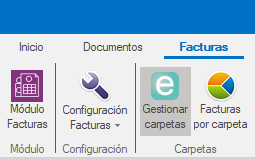
Step 1: Open Gestionar carpetas (Manage folders)
- Open Ubyquo.
- Go to Gestionar carpetas (Manage folders) from the menu.
Step 2: Change the data connection
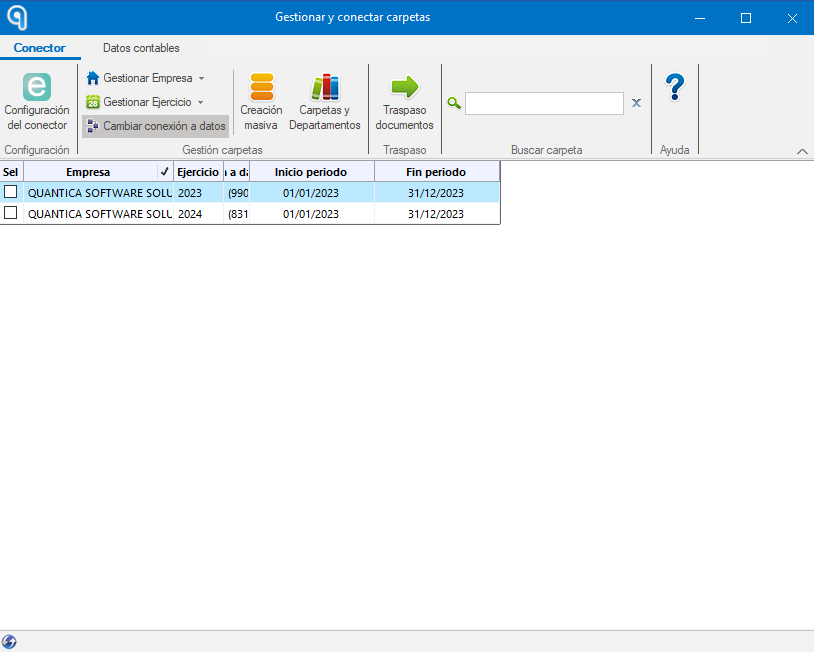
In the Gestionar carpetas window, click:
Cambiar conexión a datos (Change data connection)
From this option you can set up the paths Ubyquo will use to connect to A3 and to the SUENLACE link folder.
Step 3: Connect the directories
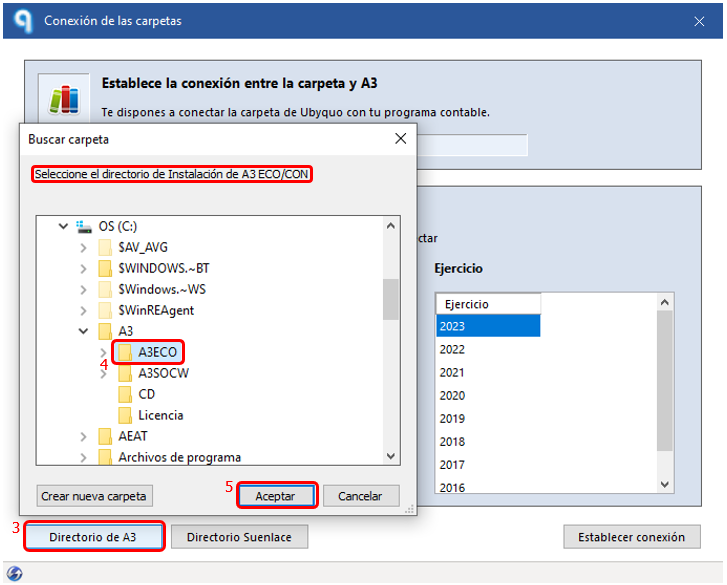
Set up the paths in the following order:
Connect the A3ECO/A3CON directory
First, select and connect the directory for A3ECO/A3CON.
It must be the root folder where A3 is installed.
Connect the SUENLACE link directory
Next, select the directory used to exchange files through SUENLACE.
The path is:
A0_SUENLACE
This is the folder where Ubyquo will generate and read the file SUENLACE.DAT used for accounting communication with A3.
Important: do not click “Establecer Conexión” (Establish Connection)
Once both paths have been selected correctly:
- The A3ECO/A3CON directory
- The A0_SUENLACE directory
Do not click the “Establecer Conexión” button.
Once the paths are selected, simply close the window.
Per-user folders inside A0_SUENLACE
In some environments, the A0_SUENLACE folder may contain specific subfolders for each user.
If so, you must select the folder for the user who will run the import from A3.
Check that the selected path belongs to the user who will use the accounting link process.
Checking folder permissions
Before running an export, check that the user has read and write permissions on the configured folders.
If Ubyquo and A3 are on different computers or servers, also make sure that:
- The network paths are accessible from the computer where Ubyquo runs.
- The network drives are correctly mapped.
- The drive letter used is visible from Ubyquo.
- The user has enough permissions to create and read files in
A0_SUENLACE.
Once both paths are set up correctly, Ubyquo will be able to use the A0_SUENLACE folder to generate and read the SUENLACE.DAT file during the accounting link process with A3.