
Updated on 24 September 2026
Error when synchronizing an A3 company
Reorganize the company's files in A3 and synchronize again to fix the error.
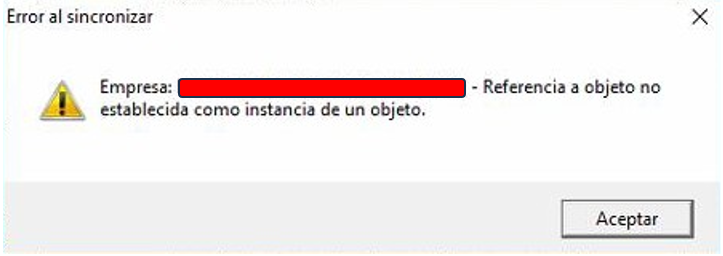
When an error appears while synchronizing a company between Ubyquo and A3ECO or A3CON, you need to reorganize certain company files from A3 and run the synchronization again.
1
Before you start
Before making any changes, keep the following recommendations in mind:
- Make a backup of the company's database.
- Make sure no other user is working in the company from A3 during the process.
If other users are connected to the company, the reorganization may not finish correctly.
2
Reorganize the files in A3
- Open A3 and select the affected company.
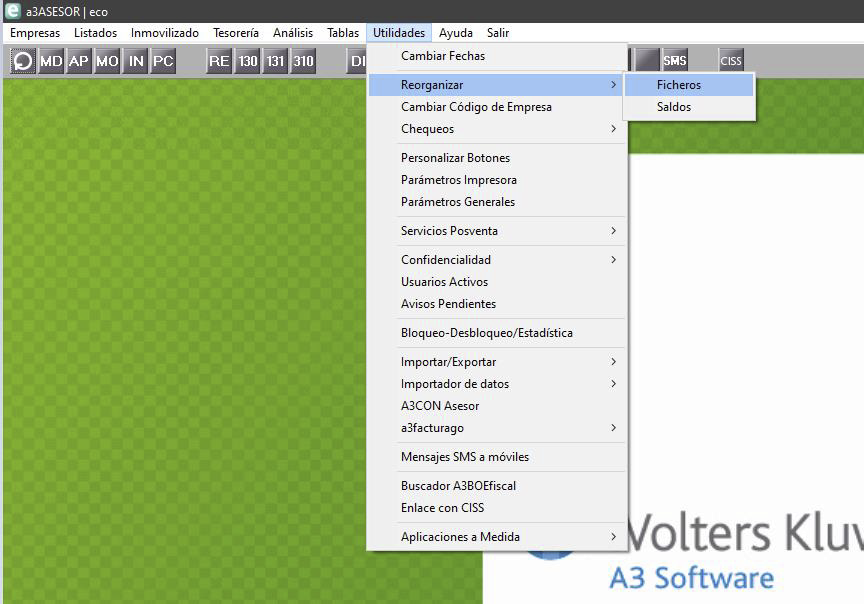
- In the top bar, go to: Utilidades > Reorganizar > Ficheros (Utilities > Reorganize > Files)
- In the reorganization window, tick the following options:
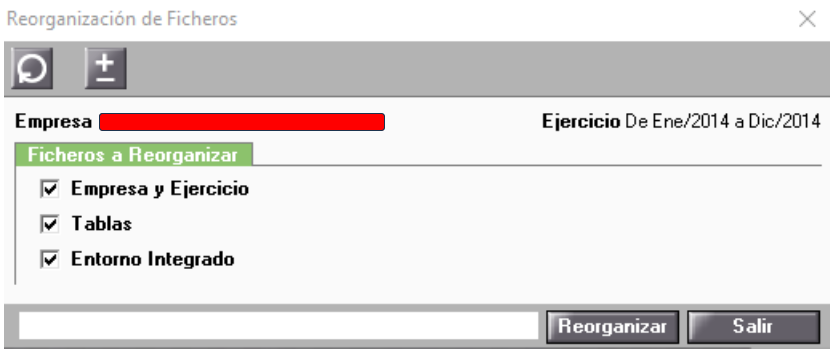
- — Empresa y Ejercicio (Company and Fiscal Year)
- — Tablas (Tables)
- — Entorno Integrado (Integrated Environment)
- Run the reorganization and wait for the process to finish.
If the reorganization does not finish correctly, contact A3 technical support before continuing.
3
Go back to Ubyquo and synchronize
Once the reorganization has finished successfully:
- Go back to Ubyquo.
- Run the full company synchronization again.
- Check whether the synchronization now finishes correctly.
If the error continues after these steps, you will need to review the specific error message and the connection setup between Ubyquo and A3.