
Updated on 23 September 2026
Invoices with non-deductible VAT in Sage
Set up Sage and Ubyquo to post invoices with non-deductible VAT correctly.
Invoices with non-deductible VAT (IVA) require specific settings in Sage to determine how the VAT must be posted and how it must be handled from Ubyquo.
Below we explain the different ways to post a non-deductible invoice and the settings needed in Sage and Ubyquo.
Deductible invoice
On an invoice with deductible VAT:
- The VAT is posted to account 472.

- On the VAT line, the Deducible (Deductible) checkbox is ticked.

Non-deductible invoice by company
When a company's VAT is not deductible, the VAT amount is not posted to account 472 but is included in an expense account.
You can use:
- The same contra account, recording the VAT expense in the same account. In this case, the journal entry will have 3 lines.
- A specific account, such as 631.

In the VAT information, the Deducible checkbox must be unticked.

Non-deductible invoice by supplier
This method lets you set non-deductibility at supplier level. It is not the recommended method, although it works.
In this case:
- The VAT amount is added to the expense.
- The journal entry is generated with 2 lines.

The settings used are:
- VAT code = 2
- Transaction type = 37 (Exempt Operations)
- Deductible = ticked

With these settings, the VAT is not broken down in the invoice ledger, although the tax forms are generated correctly.
Ubyquo settings
Ubyquo can identify that an invoice must be treated as non-deductible from the existing settings in Sage.
Settings per supplier
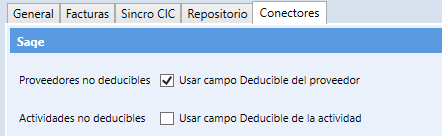
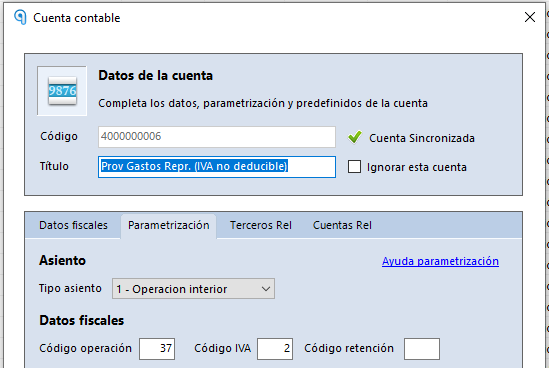
In Sage, the supplier's account must have one of the following options set:
- Operation code = 37
- VAT code = 2 and Operation code = 1
- Operation code = 37 directly
Ubyquo will detect these settings automatically.
Settings per company: non-deductible activities
Some companies may have activities for which the VAT on purchases is not deductible.
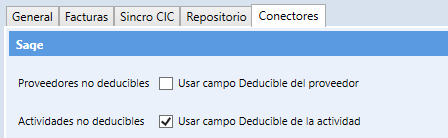
Setting up the activity in Sage
- Go to Inicio > Empresas > Actividades (Home > Companies > Activities).
- Set the activity as No deducible (Non-deductible).
Turning on the setting in Ubyquo
In Ubyquo:
- Go to Inicio > Utilidades > Configuración aplicación > Conectores (Home > Utilities > Application settings > Connectors).
- Turn on the Respetar configuración de actividad (Deducible) (Respect activity setting (Deductible)) option.
Important: this option affects all companies. Before turning it on, you need to check that the activities of all companies are correctly set up in Sage.
Setting the account used for non-deductible VAT
Sage lets you define which ledger account it will use to record non-deductible VAT.
Go to:
Inicio > Empresas > Configuración > Definición de cuentas (Home > Companies > Settings > Account definition)
Find the Cuenta IVA no deducible (Non-deductible VAT account) box.
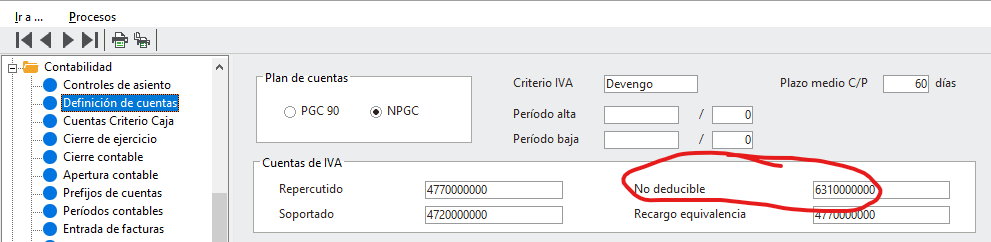
The behavior will depend on whether this box is filled in:
- If it is filled in: the account indicated will be used, for example 631.
- If it is empty: the same contra account will be used to record the VAT.
Expected result
Once non-deductibility is correctly set up in Sage and Ubyquo:
- Invoices will be posted with the treatment that corresponds to non-deductible VAT.
- Non-deductible VAT will not go to account 472.
- Sage and Ubyquo will apply the settings defined for the company or the supplier.
- The tax information will be kept ready for generating the corresponding tax forms.

