
Updated on 23 September 2026
Issued invoices with Fra/Reg 99999999 in Sage
Fix the numbering of issued invoices by renumbering them in Sage at year-end.
If issued invoices from Sage appear in Ubyquo with the Fra/Reg 99999999 field, you need to review the invoice numbering in Sage.
To keep the numbering sequential and avoid numbering-related problems, we recommend renumbering invoices at the end of the fiscal year.
Renumbering issued invoices in Sage
Wait for the fiscal year to close
Renumber once the fiscal year has ended.
This avoids changing the numbering while the year is still in progress and there are invoices yet to be issued.
Use Sage's invoice renumbering
In Sage, use the Invoice renumbering feature to set up an orderly sequence for the issued invoices.
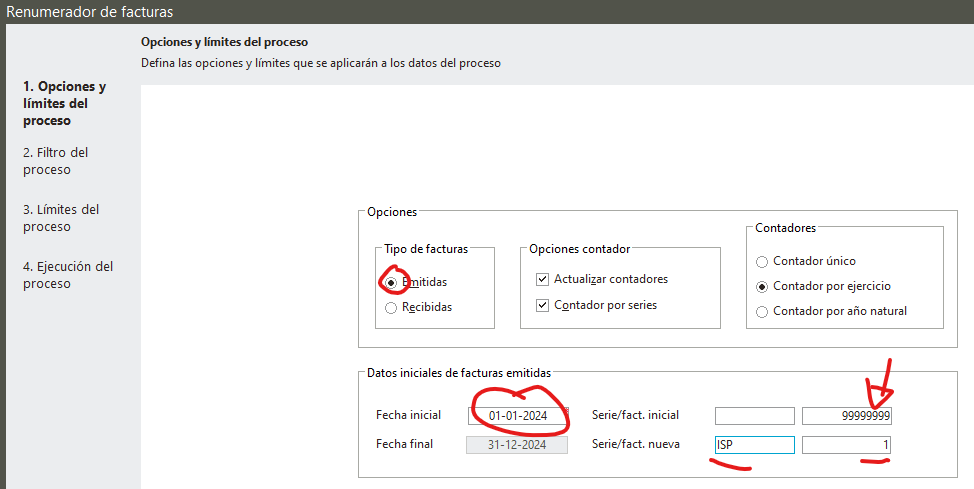
Select the renumbering series
When renumbering, select a series different from the one you normally use.
This helps you avoid:
- Numbering mix-ups.
- Duplicate invoices.
- Accounting or tax validation problems.
Once the renumbering is done in Sage, check the issued invoices in Ubyquo again to make sure the Fra/Reg information is displayed correctly.