
Updated on 24 September 2026
How to post an invoice again after it has been exported to the ERP
Return an exported invoice to To be posted, correct it and send it again to your accounting software.
If you need to change and post again an invoice that has already been exported to the ERP or accounting software, you can return it to the Por contabilizar (To be posted) stage, make the necessary changes and export it again.
Steps to post the invoice again
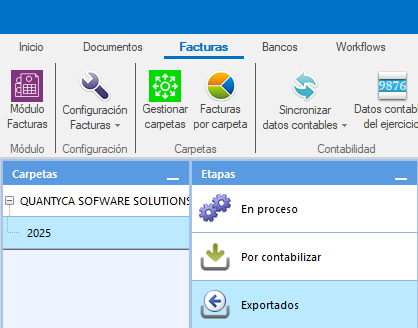
Go to the exported invoices
In the Facturas (Invoices) tab in Ubyquo, go to the Exportadas (Exported) stage.
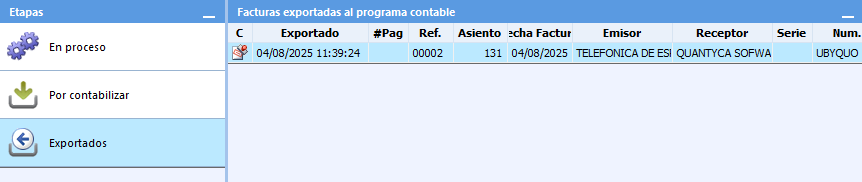
Select the invoice
Select the invoice or invoices you want to post again.
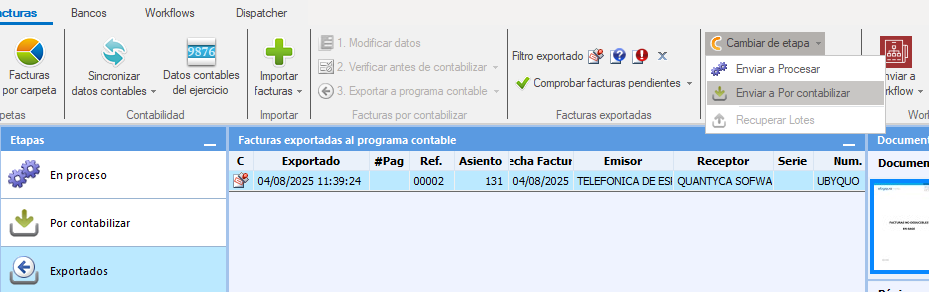
Return the invoice to “Por contabilizar”
At the top, select:
Cambiar etapa > Enviar a Por contabilizar (Change stage > Send to To be posted)
Edit the invoice data
Go to the Por contabilizar stage and change or complete the invoice data you need.
Once you have made the changes, save the invoice.
Turn off the automatic move to Exported
Before exporting the invoice again, uncheck the option:
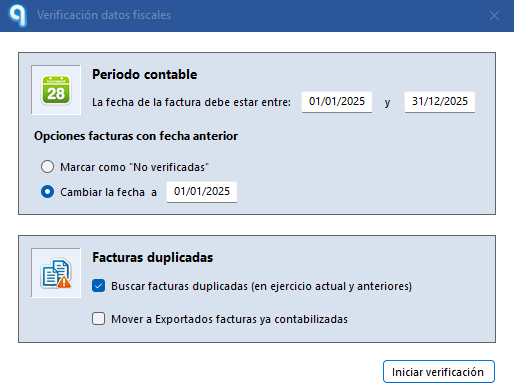
Mover a Exportados facturas ya contabilizadas (Move already posted invoices to Exported)
This option must be turned off to prevent the invoice from going straight to Exportadas without going through the export process again.
Export the invoice again
Once you have made the changes and turned off the previous option, export the invoice to the ERP again.
The invoice will go through the export process again with the updated data.