
Updated on 24 September 2026
Which document data is synchronized with the ERP
Find out which data is synchronized with the ERP, such as the journal entry and the VAT register, and which is not.
This feature lets you synchronize certain changes made in Ubyquo with the connected ERP or accounting software, keeping the information in Ubyquo consistent with the data recorded in the ERP.
Synchronizing changes with the ERP

Synchronization lets you update in the ERP certain data that was changed in Ubyquo.
Data that is synchronized
The fields that are synchronized with the ERP are:
- Asiento contable (Journal entry)
- Registro de IVA (VAT register)
Data that is not synchronized
The rest of the fields changed in Ubyquo are not updated in the ERP, for example:
- Analytics
- Comments
- Other data changed in Ubyquo that is not part of the journal entry or the VAT register.
These fields should reflect only the information officially recorded in the ERP.
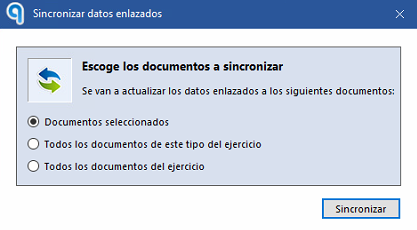
Create a file to view the documents
This option generates a file needed to view the documents correctly from the ERP or accounting software.
It can be especially useful in the following situations:
- After a data migration in the ERP.
- When the documents do not display correctly from the accounting software.
- To force a refresh of the display of journal entries or invoices from the ERP.
When should you use this feature?
We recommend using this feature when:
- You detect a mismatch of information between Ubyquo and the ERP.
- You have made adjustments to journal entries or VAT registers in Ubyquo that must be correctly reflected in the ERP.
- You need to rebuild the link between the documents and the journal entries shown from the accounting software.
- After a data migration, you need to regenerate the information used to view the documents correctly from the ERP.