
Updated on 24 September 2026
How to delete unposted documents
Identify documents that have not been posted and delete them carefully, knowing there is no way back.
From the Documentos (Documents) tab in Ubyquo you can delete documents that have not been posted yet.
Documents are considered unposted when they do not have the posted icon in the C column.
Important
Deleting documents is permanent and cannot be undone.
Before deleting them, check that the selected documents can be deleted and that they do not contain information you need to keep.
Go to the Documentos tab
Open Ubyquo and go to the Documentos tab.
Identify the unposted documents
Review the documents and find the ones that do not have the posted icon in the C column.
You can filter the documents or review them visually to identify them.
Select the documents
Select the documents you want to delete.
You can select one or several documents.
Delete the documents
Click the Eliminar (Delete) button.

Confirm the deletion
When Ubyquo asks for confirmation, confirm the deletion.
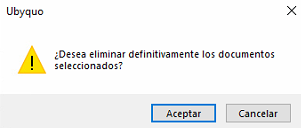
The selected documents will be permanently deleted from Ubyquo.