
Updated on September 29, 2026
Configuring company settings in Orders & Delivery Notes
Define how journal entries are generated, the allocation tolerances and the contra account for balancing entries.
Company settings in the Invoices module
The Ubyquo Invoices module lets you configure various settings to adapt the application's behavior to the needs of each company.
From the company settings, you can define how journal entries are generated, set tolerances for automatic allocation, and decide which contra account is used to balance entries.
Below are the steps to reach these settings and the options available.
Open the company settings
- Go to the Invoices module.
- Make sure you are in the fiscal year you want to configure.
- Click the Configuración Facturas (Invoice Settings) button.
- Select the Configuración empresa (Company Settings) option.
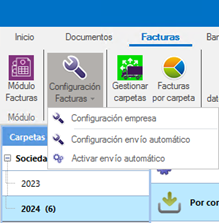
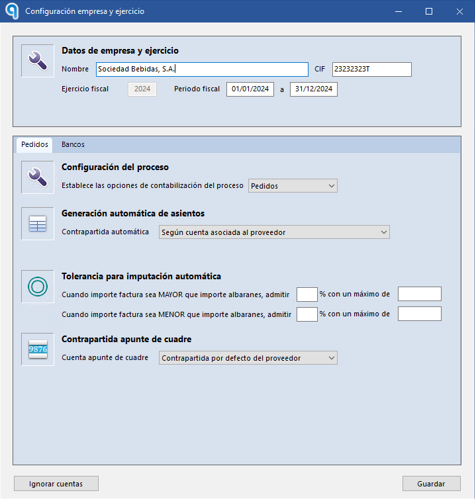
A window will open showing the different configuration options available.
Configure automatic journal entry generation

In this section, you can define how Ubyquo should generate journal entries after extracting the data from the documents.
The following options are available:
- Según cuenta del proveedor (According to the supplier's account): Ubyquo will use the ledger account defined on the supplier record to generate the journal entry automatically.
- Según cuentas asociadas a los artículos (According to the accounts linked to the items): Ubyquo will use the ledger accounts linked to the items on the delivery note to generate the corresponding journal entry.
Configure the tolerance for automatic allocation

In this section, you can set the tolerance threshold that allows small differences between the amount of the delivery notes and that of the invoices during automatic allocation.
This setting helps avoid errors or blocks when there are discrepancies within the tolerance margin you have set.
Configure the contra account for the balancing entry
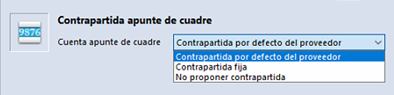
In this section, you can define how Ubyquo should handle contra accounts when journal entries are out of balance.
You have the following options:
- Contrapartida por defecto del proveedor (Supplier's default contra account): The supplier's ledger account is used automatically to settle the entry.
- Contrapartida fija (Fixed contra account): The same ledger account is always used, entered manually in this window.
- No proponer contrapartida (Do not suggest a contra account): No contra account is assigned automatically. You will need to enter it manually when balancing the entry.