
Updated on November 12, 2026
How to move invoices from Purchasing to Accounting
Guide to move invoices that have no delivery note to the Accounting module.
Recommendation
We recommend loading the documents first from the Compras (Purchasing) module so that the data is extracted. Once this process is complete, the invoices that have no delivery note can be moved to the Contabilidad (Accounting) module.
- 1
Load the invoices and send them to automatic extraction
Load the invoices from the Compras (Purchasing) module and send them to automatic extraction. Once processed, they appear on the «Facturas» (Invoices) tab in the «Por contabilizar» (To be posted) status.
More information: How do I add invoices in Orders & Delivery Notes? and How to send order invoices to automatic posting.

- 2
Select the invoices and move them to Accounting
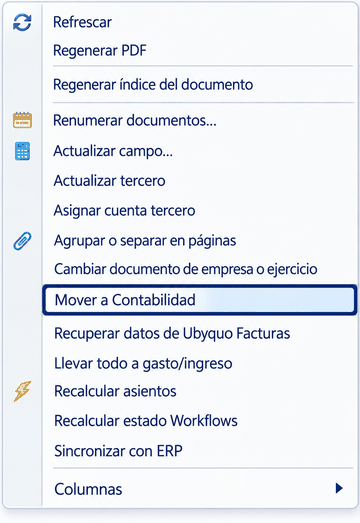
When the invoices are in the «Por contabilizar» (To be posted) status, select the invoice or invoices you want to move. Then right-click and choose «Mover a Contabilidad» (Move to Accounting) in the context menu.
- 3
Switch between the Purchasing and Accounting modules
To switch module, use the drop-down menu at the top right of Ubyquo and select «Compras» (Purchasing) or «Contabilidad» (Accounting), depending on the area you want to work in.
More information: How to switch between the Purchasing and Accounting modules.
Important: this procedure is for invoices that have no delivery note.