
Updated on September 24, 2026
Ubyquo does not assign ledger accounts automatically
Find out why a ledger account is not assigned to an invoice and how to fix it in each case.
If Ubyquo does not automatically assign the ledger account when processing an invoice, there are two main possible causes.
Chart of accounts not synchronized
The problem can occur when the chart of accounts (Plan Contable) is not properly synchronized or when the journal contains no entries for the relevant customer or supplier.
Solution
Synchronize the accounting data from Ubyquo:
Once the synchronization has finished, process the invoice again and check whether Ubyquo assigns the account automatically.
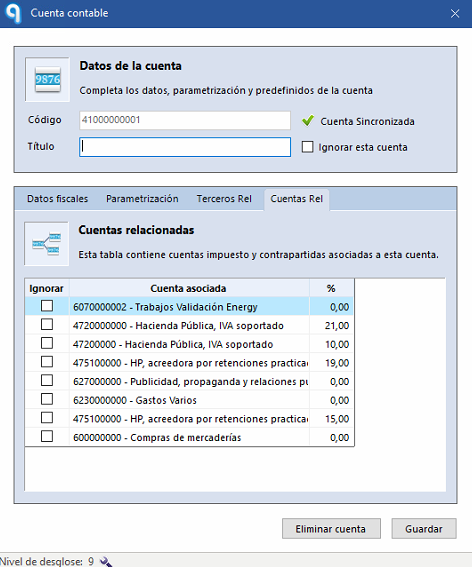
Several related accounts exist
If the list of related accounts contains more than one possible account for the same customer or supplier, Ubyquo cannot automatically determine which one to use.
In this case, you need to select the ledger account manually.
Recommendation
If you only need to use one of the related accounts, you can ignore the other accounts from the customer or supplier record.
This way there are no multiple options available, and automatic ledger account assignment works more easily on future invoices.