
Updated on September 24, 2026
How to change the company or fiscal year of invoices
Move one or several invoices to another company and fiscal year from the Invoices tab in a few steps.
From the Facturas (Invoices) tab you can easily move one or several invoices to another company and fiscal year.
Select the invoices
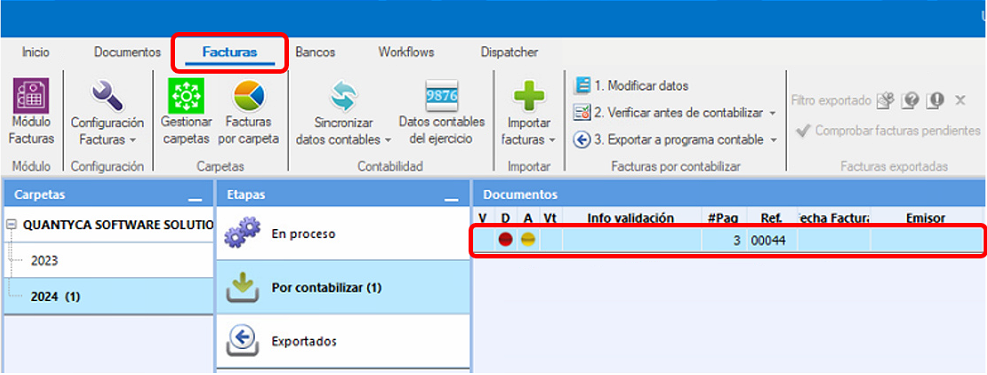
Go to the Facturas tab and select the invoices you want to move.
Change the company or fiscal year
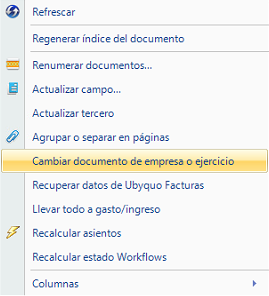
Right-click the selected invoices and select:
Cambiar los Documentos de Empresa o Ejercicio (Change the documents' company or fiscal year)
Select the destination company and fiscal year
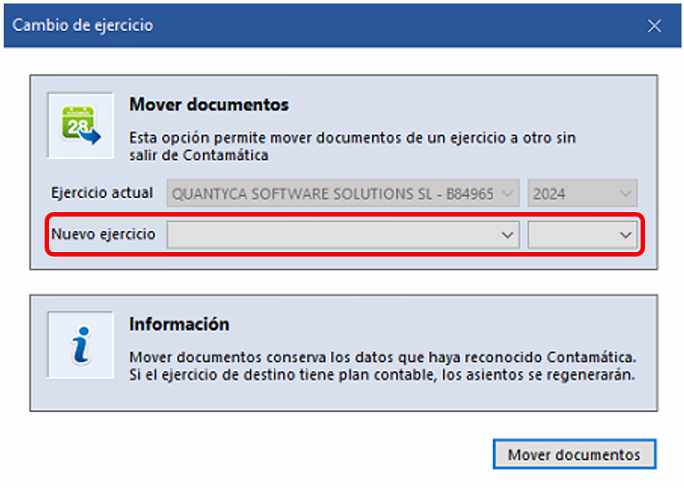
A window will open where you can select the destination company and fiscal year.
Set the drop-down lists to the corresponding values.
Save the changes
Once you have selected the destination company and fiscal year, save the changes.
Wait for the process to finish
Ubyquo will process the change for a few seconds. The time needed depends on the number of invoices selected.
Once the changes are saved, refresh the screen to see the invoices being moved to the selected company and fiscal year.