
Updated on September 24, 2026
Cash payments of invoices with balance transfer in Sage
If you use Sage, set up cash payment with Traspasar saldo from the Chart of Accounts or the editor.
If you use Sage as your accounting software, Ubyquo lets you set up the cash payment of invoices using the Traspasar saldo (Transfer balance) option.
You can set it up from the Plan Contable (Chart of Accounts) or directly from the Editor de Facturas (Invoice Editor).
Method 1: Set up the transfer from the Chart of Accounts
You can open the Chart of Accounts from the Documentos (Documents), Facturas (Invoices) or Bancos (Banks) tabs.
- Go to the Documentos, Facturas or Bancos tab.
- Click Datos contables del ejercicio (Fiscal year accounting data).

- Go to the Plan Contable tab.
- Set the Traspasar saldo field of the relevant ledger account.
Modifying a single account
To set up a specific account:
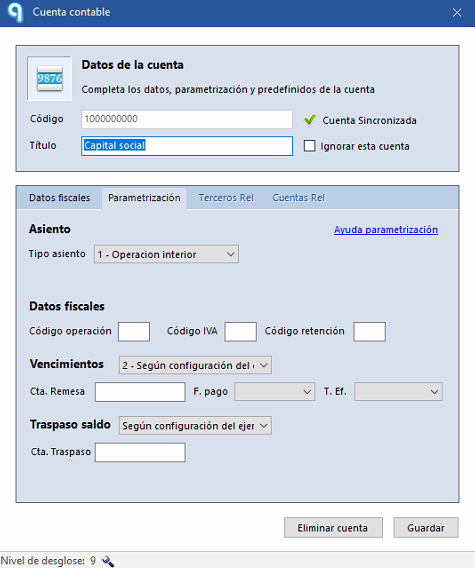
- Select Modificar cuenta (Edit account).
- The account record will open.
- In the Traspasar saldo field, enter the cash account or the relevant destination account.
Bulk editing of accounts
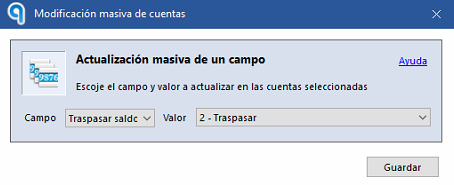
You can also set up the transfer for several accounts at once using Modificación masiva (Bulk edit).
This option lets you apply the same transfer to several accounts.
Method 2: Set up the transfer from the Invoice Editor
You can also set up the transfer directly on an invoice.
- Go to the Facturas tab.
- Open the Editor de Facturas by double-clicking the invoice or selecting Modificar datos (Edit data).
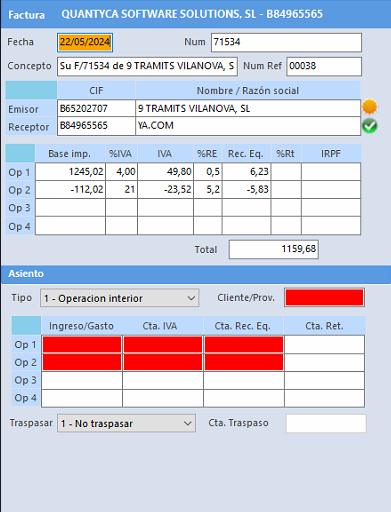
- Find the Traspasar (Transfer) option.
- Select the relevant transfer account, for example, a cash account.
Result
Once Traspasar saldo is set up, the invoice will be ready to be recorded through the cash account or the selected destination account.
When you export the journal entries, Sage will use this setting to reflect the corresponding transfer correctly.