
Updated on September 24, 2026
Ubyquo freezes when editing an invoice
Fix freezes when editing invoices by fully synchronizing the Chart of Accounts with your ERP.
When trying to edit an invoice from the Invoices module in Ubyquo, the application may sometimes freeze or close unexpectedly.
This behavior may be related to a lack of synchronization of the Chart of Accounts between Ubyquo and the connected accounting software, such as Sage, Glasof, etc.
What causes the problem?
The freeze can occur when an account is not correctly synchronized between Ubyquo and the accounting software.
To fix it, you need to run a full synchronization of the Chart of Accounts.
How to fix it
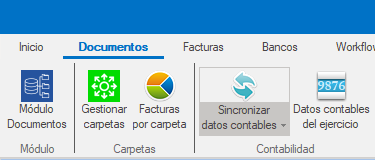
Go to the accounting data synchronization
From the top menu of Ubyquo, select:
Sincronizar datos contables (Synchronize accounting data)
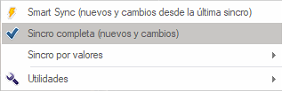
Select the necessary options
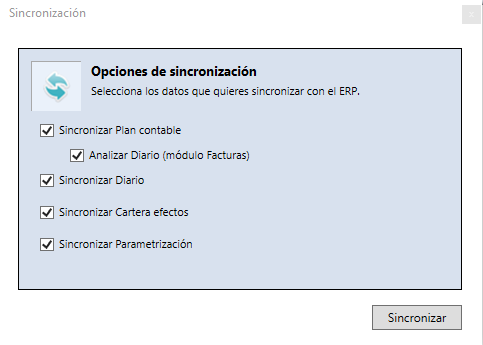
In the synchronization window, select only the following options:
- Plan Contable (Chart of Accounts)
- Analizar Diario (módulo Facturas) (Analyze Journal, Invoices module)
Wait for the synchronization to finish
The process can take a few minutes, depending on the volume of data.
Wait until Ubyquo indicates that the synchronization has finished successfully before continuing.
Edit the invoice again
Once the synchronization has finished, go back to the Facturas (Invoices) module and try to edit the invoice again.
If the freeze was caused by a lack of synchronization of the Chart of Accounts, the problem should now be solved.