
Updated on September 21, 2026
Forgot your password? How to recover it
Get back into your account by requesting a new password from Ubyquo, CI Cloud or Central eFactura.
If you have not received your user password or you do not remember it, you can request a new one from Ubyquo or from the CI Cloud / Central eFactura web platform.
Recovering the password from the Ubyquo software
- In the Ubyquo login window, click ¿Olvidó su contraseña? (Forgot your password?)
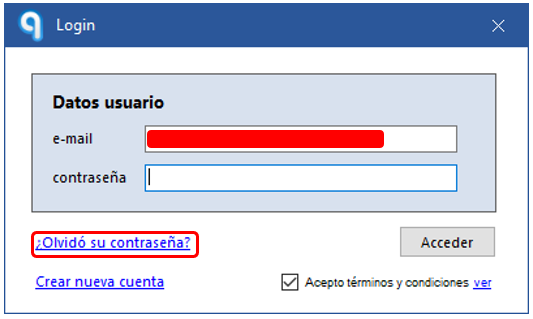
- Ubyquo will automatically generate a new password. Click Aceptar (OK).
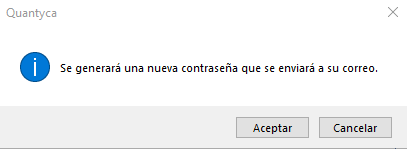
- You will receive an email with the new password at the address associated with your user.
Once you have received it, you can use it to log in to Ubyquo.
Recovering the password from CI Cloud or Central eFactura
If you access Ubyquo through the CI Cloud or Central eFactura web platform, you can recover the password from the login screen.
- On the Ubyquo CI Cloud login page, click ¿Olvidaste tu contraseña? (Forgot your password?)
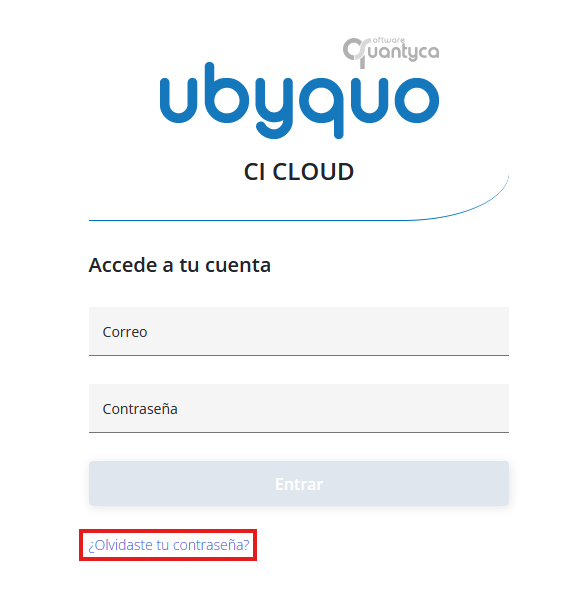
- Enter the email address associated with your user and click Generar contraseña (Generate password).
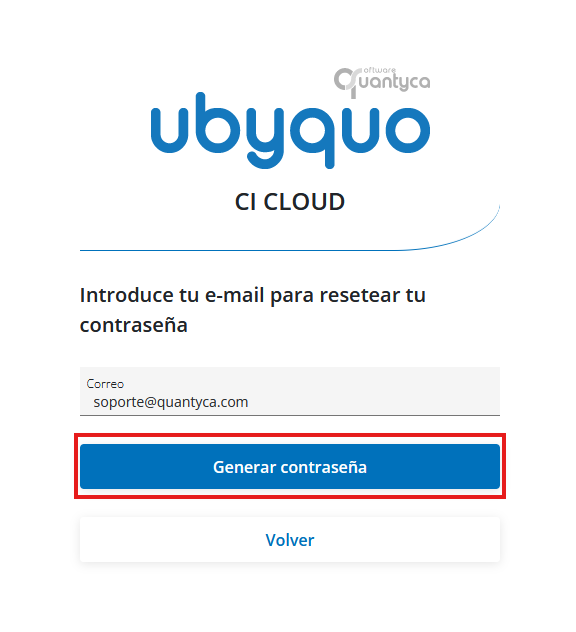
- You will receive an email with your new password at the registered address.
With the new password you will be able to log in to your account again.