
Updated on 18 September 2026
What do I do if the delivery note hasn't been brought in from the ERP?
Recover missing delivery notes from Sage with a Smart Sync or by synchronizing from a given date.
When a delivery note has not been brought in from the Sage ERP/accounting software, do the following:
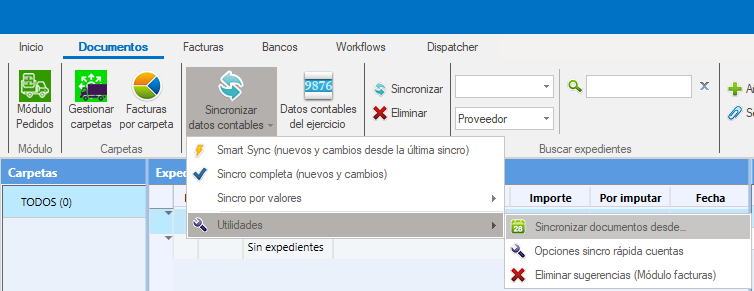
Run a Smart Sync of documents:
Do a quick, selective synchronization to update the documents. Run a Smart Sync synchronization.
Synchronize from a specific date:
Go to Documentos > Sincronización > Utilidades > Sincronizar desde (Documents > Synchronization > Utilities > Synchronize from) and select the date from which you want the documents to be synchronized.
Important:
Before synchronizing from a date, close Ubyquo to stop any active synchronization and avoid conflicts.
If the delivery note still doesn't appear after these steps:
Contact Quantyca's technical support so they can investigate and fix the problem.