
Updated on 18 September 2026
How to send order invoices to automatic posting
Send your invoices to data extraction, choosing whether to use the first or the last page.
Sending invoices from the Documents module
To send invoices correctly, follow these steps:
1
Select the invoices to send
- Tick the invoices you want in the general list.
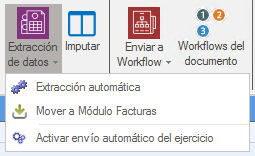
- Click the “Extracción de datos” (Data extraction) button at the top.
2
Set up the automatic extraction
- In the dialog box that appears, select whether you want to send:
- — The first page of the invoice
- — The last page of the invoice
- This option defines which part of the document is used for the preview or for sending.
3
Confirm the process
- Click “Aceptar” (OK) to complete the extraction and send the corresponding data.