
Updated on 29 September 2026
Ubyquo closes when I click the Dispatcher tab
What to do if Ubyquo closes when you open Dispatcher: locate and recover the damaged Excel file.
If Ubyquo closes unexpectedly when you open the Dispatcher tab, the associated Excel file may be damaged or corrupted.
To fix the problem, follow the steps below.
1
Identify the location of the Excel file
The problematic file is usually found in the following path:
XXXX\Quantyca\Ubyquo\BBDD\EmailDestinatariosDispatcher_xxxx.xlsx
How to locate the file
- Right-click the Ubyquo icon.
- Select Abrir la ubicación del archivo (Open file location).
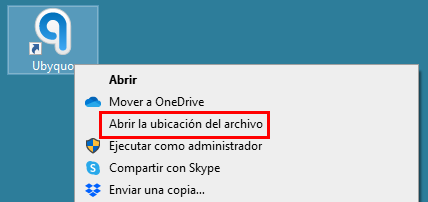
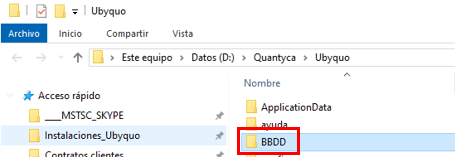
- Once in the main folder, open the BBDD subfolder.
- Find the file
EmailDestinatariosDispatcher_xxxx.xlsx.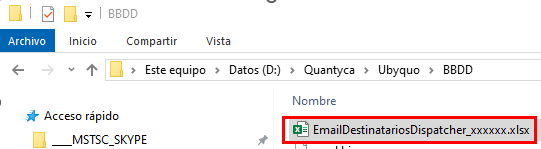
2
Open and recover the Excel file
- Try opening the file directly with Excel.
- If a recovery message appears, follow the wizard's instructions to try to repair it.
- If it cannot be recovered:
- — Rename the file, for example, as
EmailDestinatariosDispatcher_xxxx_backup.xlsx. - — Make a backup copy of the file before replacing it.
3
Recommendations
- Make regular backups of the file
EmailDestinatariosDispatcher_xxxx.xlsx. - Keep a double backup strategy so you have an additional copy in case the first one fails.
- Make sure the file is not open on another computer when you start Ubyquo.