Updated on September 29, 2026
Unrecognized documents in Dispatcher ("No definido")
Fix documents that appear as No definido (Undefined) by first checking the PDF download.
If a document is not recognized by the Dispatcher module (for example, it appears as No definido (Undefined) or is not deducted correctly), you need to check that the file was downloaded correctly and, if the problem persists, report the issue to the technical team.
The steps to identify and fix the problem are detailed below.
Check that the document was downloaded correctly
Important: Dispatcher only accepts documents in PDF format.
See the following article to download AEAT documents correctly:
Follow these checks:
- Do not open or save the documents with other programs that may modify them, such as PDF editors or virtual printers.
- Open the PDF document with a standard reader, such as Adobe Acrobat Reader.
- Go to Propiedades del documento (Document properties) and check that:
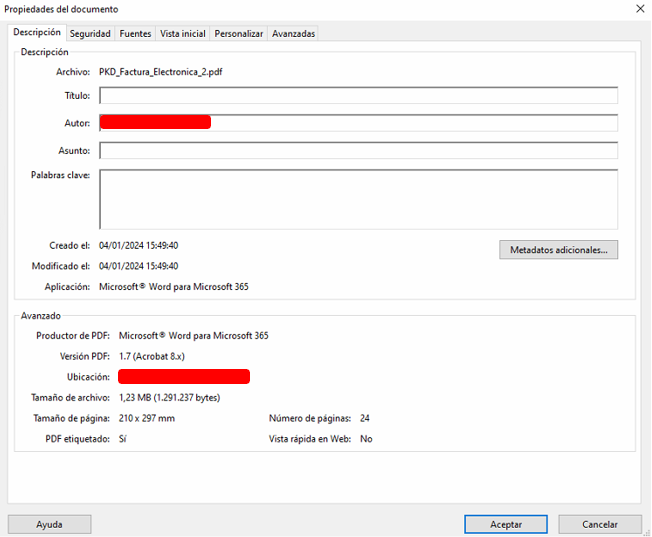
- — The producer is
AEAT. - — No third-party tools or modifications appear in the document.
If the document was downloaded using the Imprimir (Print) option, download it again by selecting Descargar documento (Download document).
Report the issue if the document is correct but not recognized
If you have checked that the document is valid and it is still not recognized, report the issue by following these steps:
- Select the affected document in the Dispatcher module.
- Right-click it and select Comunicar incidencia (Report issue).
- An e-mail addressed to
dispatcher@quantyca.comwill open automatically with the data needed to analyze the problem. - Send the e-mail without changing its content.
Apply the fix
The document recognition update is done automatically when you reopen Dispatcher.
If the document is still not recognized, you can force the update from the application itself:
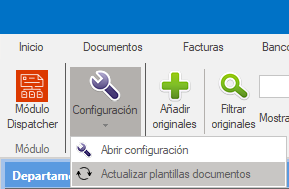
- Go to the Configuración (Settings) tab.
- Select Actualizar plantilla de documentos (Update document template).