
Updated on September 24, 2026
How to delete bank transactions
Learn which transactions you can delete and how to set them to Not posted first.
In Ubyquo, bank transactions can be deleted from the account and card management screen. However, some restrictions apply to avoid inconsistencies in the transaction history.
Important
- You cannot delete intermediate transactions, as this would leave gaps in the dates of the history.
- You cannot delete transactions that are posted. Before deleting them, you need to change their status to No contabilizado (Not posted).
Marking transactions as Not posted
If the transactions you want to delete are in the Exportados (Exported) stage, you must first change their status:
- Go to the Bancos (Banks) tab and enter the Exportados stage.
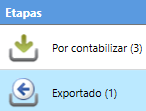
- Select the bank transactions you want to delete.
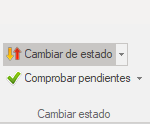
- At the top, select Cambiar de estado (Change status).
- Select Marcar como No contabilizado (Mark as Not posted).
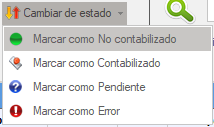
Once the change is made, the transactions can be managed from the Por contabilizar (To post) stage.
Deleting bank transactions
- Go to the Bancos tab and enter the Por contabilizar stage.
- At the top, select Gestionar cuentas y tarjetas (Manage accounts and cards).
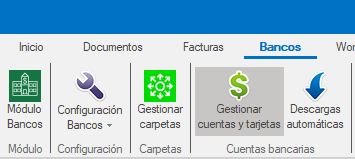
- In the management window, select the bank account whose transactions you want to delete.
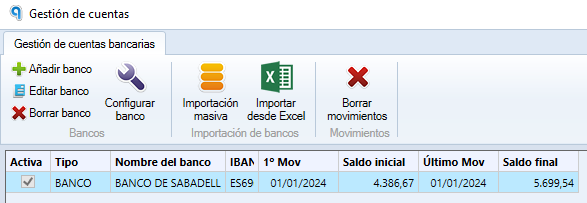
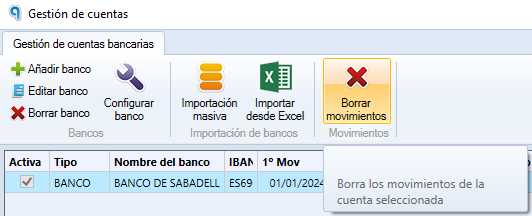
- Select Borrar movimientos (Delete transactions).
- In the window that appears, select the range of transactions you want to delete.
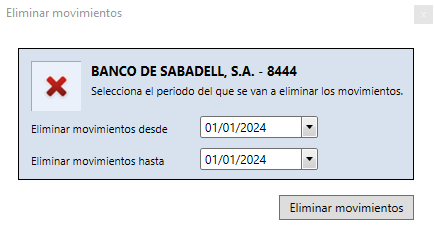
The transactions in the selected range will be deleted from the bank account.