
Updated on September 24, 2026
How to find the cause of a mismatch between bank and ledger
Use the Conciliación tool to compare transactions and locate balance differences.
The Conciliación (Reconciliation) option in the Ubyquo Banks module lets you compare bank transactions with the records in the ERP or accounting software to identify possible differences between the bank balance and the general ledger balance.
Open the reconciliation tool
- Go to the Bancos (Banks) module.
- At the top, select Conciliación.
This tool lets you compare the transactions in Ubyquo with those in the accounting software.
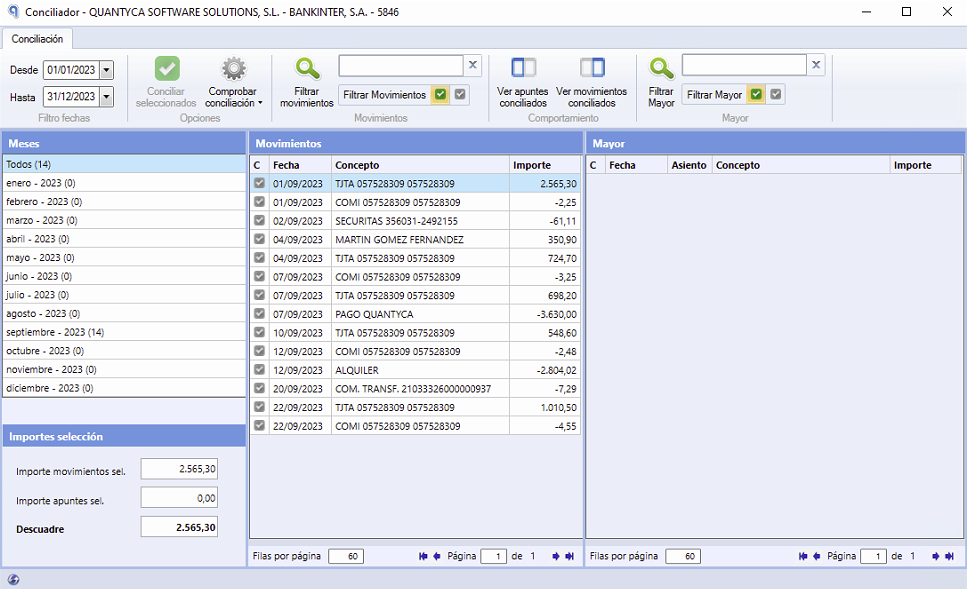
Locate the mismatch
- Select the bank transaction you want to review.
- Go to the month that matches the transaction date.
- Check whether there is a mismatch between the bank transactions and the accounting records.
Identify the cause of the mismatch
One possible cause is that a transaction was first posted in the ERP or accounting software and the same transaction was later added in Ubyquo without syncing the journal.
This situation can cause differences between the bank and accounting records.
Correct the mismatch
If the mismatch is caused by duplicate transactions:
- Review the transaction posted in the ERP or accounting software.
- Identify and delete the duplicate journal entries.
- Run the reconciliation again to check whether the difference has been fixed.
This procedure lets you locate and correct differences between the bank balance and the general ledger balance, especially during accounting closings.