Updated on September 24, 2026
Assign the same contra account to several bank transactions
Save time by assigning the same ledger account to several transactions with no contra account in one go.
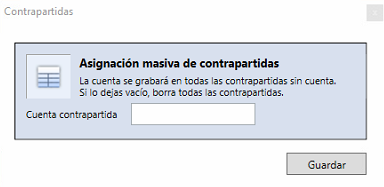
The Asignación masiva de contrapartidas (Bulk contra account assignment) option lets you assign the same ledger account to several bank transactions at once, as long as the contra account field is empty.
1
Open the bank transactions editor
- Go to the Bancos (Banks) tab.
- Open the transactions editor using one of these options:
- — Double-click any transaction.
- — Select Modificar datos (Edit data) at the top.
2
Open the bulk contra account assignment
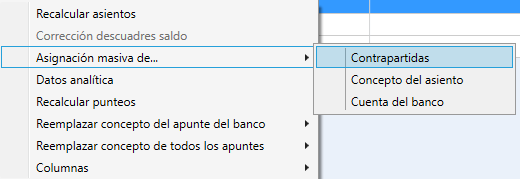
- Right-click a transaction to display the available options.
- Select Asignación masiva de contrapartidas.
3
Select the contra account
- Choose the ledger account you want to assign as the contra account.
- Keep in mind that a contra account can only be assigned to transactions whose field is empty.
Important: If you need to change a contra account that is already assigned, you must first leave the Contrapartida (Contra account) field blank and save the changes.
4
Apply the bulk assignment
- Repeat the contra account selection to apply the assignment in bulk.
- Ubyquo will apply the change to all transactions whose Contrapartida field is empty.
You can also use this function to leave all transactions without a contra account, if you need to.