Updated on 24 September 2026
Export and import errors in SAP Business One
Fix the errors caused by blocked suppliers or missing permissions when importing invoices into SAP Business One.
When importing invoices from Ubyquo into SAP Business One, errors may appear that are related to the status of suppliers or to the user's permissions.
The most common errors and the steps to solve them are described below.
Inactive or blocked supplier or vendor
SAP code: 10001070
Error message:
Vendor/Proveedor P0309 is inactive
The supplier or vendor linked to the invoice is marked as inactive or blocked in SAP Business One, which prevents the import from completing.
- Go to SAP Business One and find the record of the supplier named in the error message.
- Check that the supplier is active.
- Check whether it has any block and, if applicable, remove it.
- Make sure the supplier is correctly linked to the corresponding company or area.
Once the supplier's status has been corrected, try the import again.
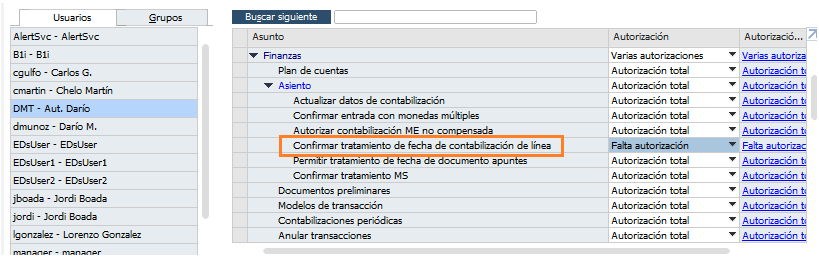
User not authorized to change the posting date by line
Error message:
You are not allowed to edit posting date by row
The user running the import does not have the necessary permissions to change the posting date at line level in SAP Business One.
- Review the user's authorizations in SAP Business One.
- Check that the user has permission to change the posting date by line.
- If the user does not have the necessary permissions, contact the SAP BASIS or security team so they can review and adjust the roles and authorizations for the import process.
Once the permissions have been updated, try the import again.