Updated on 24 September 2026
Information needed to connect SAP Business One to Ubyquo
Find out which server, database and user details to ask the customer for before connecting.
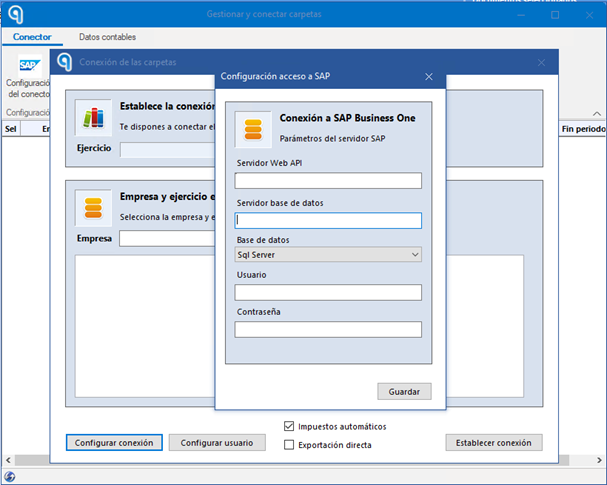
To set up the connection between Ubyquo and SAP Business One, you need to gather the access details for the server, the database and the SAP user.
Ask the customer for the following information before starting the setup.
Web API URL
What is it?
The web address that will be used to establish the connection between Ubyquo and SAP Business One.
Action: Ask the customer for the Web API URL provided by SAP or by the intermediate environment.
Server name, IP or URL
What is it?
The address of the server where the SAP database is hosted.
Action: Ask for the server name, its IP address or the corresponding URL.
Database type
What is it?
The database engine used by SAP Business One.
The supported types are:
- SQL Server
- SAP HANA
Action: Confirm with the customer which database type they use.
Database administrator user
What is it?
The user account with administrative privileges to access and query the database.
Action: Ask for the administrator user name for the database, whether SQL Server or SAP HANA.
Database password
What is it?
The password for the database administrator user.
Action: Ask for the administrator user's password provided.
SAP user with permissions on the company
What is it?
The SAP user account that has access to the companies that will be managed from Ubyquo.
Action: Ask for the SAP user name with the permissions needed to access the corresponding companies.
SAP user password
What is it?
The password of the SAP user account that will be used to establish the connection with Ubyquo.
Action: Ask for the SAP user's password provided.