
Updated on 24 September 2026
Create companies in Ubyquo in bulk from Excel
Save time by creating several companies at once with an Excel template, including with data from Sage.
Ubyquo lets you create several companies in bulk using an Excel template, so you don't have to register each company individually.
This article explains how to fill in the template, import the data and generate the company folders.
If you use Sage Despachos or Sage 200, you can get the data directly from Sage and prepare the Excel file for import.
Fill in the Excel template
Download the template provided by Ubyquo:
- Open the Excel template.
- Fill in the required fields for each company you want to create.
- Save the file when you have finished.
Important: If you use Sage Despachos or Sage 200, see the last section to get the company data automatically and prepare the template.
Go to Manage folders
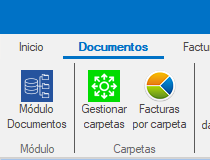
- Open Ubyquo.
- Go to the Gestionar carpetas (Manage folders) option.
Create the companies in bulk from Excel
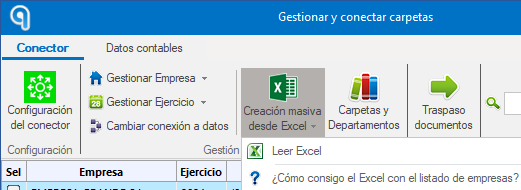
In Gestionar carpetas, follow these steps:
- Click Creación masiva desde Excel (Bulk creation from Excel).
- Select Leer Excel (Read Excel).
- Find and select the template you filled in.
- Ubyquo will automatically create the folders for the companies included in the file.
Get the data automatically from Sage Despachos or Sage 200
If you work with Sage Despachos or Sage 200, you can export the company data directly from the program to prepare the import file.
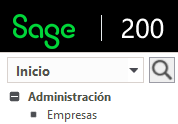
- Open Sage.
- Go to Inicio > Empresas (Home > Companies).
- Click Exportar a Excel (Export to Excel) and save the generated file.
- Open the Excel file and delete the rows of the companies you do not want to import.
- Add a column named Ejercicio (Fiscal year).
- Fill in the Ejercicio column with the fiscal year that corresponds to each company.
Important: You must add the Ejercicio column and fill in its value. If you don't, the company code will not be saved.
Once the file is ready, use Ubyquo's Creación masiva desde Excel option to import the data.