
Updated on October 9, 2026
How to download and install a new version of Ubyquo
When the update notice appears, install the new version from the server where Ubyquo is installed.
Who does it
The person with access to the server where Ubyquo is installed: the update is done directly from it. If you see the notice, let them know.
Before you start
All users must close Ubyquo on their computers.
How long it takes
Up to 1 hour. During that time, nobody will be able to use Ubyquo.
- 1
Log in to the server
Log in to the server where Ubyquo is installed.
- 2
Download the update
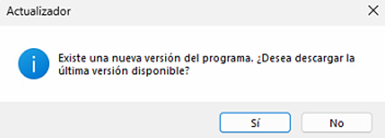
Open Ubyquo from the server and, when the update notice appears, click Descargar (Download).
If the download does not start, get the installer here: Download the Ubyquo installer.
- 3
Close Ubyquo
When the download finishes, Ubyquo will ask you to close the application to start the installation. Confirm and continue.
- 4
Complete the installation
Follow the on-screen instructions until the new version of Ubyquo is installed.
- 5
Restart the computers
When it has finished, we recommend restarting:
The main serverThe intermediate server, if there is oneThe users' computers
All done! Ubyquo now has the new version.
Do you need help with the update?
If you prefer our technical team to do it, schedule an appointment: Schedule the Ubyquo update. You can also write to us at soporte@quantyca.com.
Does something look wrong after updating?
If Ubyquo looks out of proportion or some screen elements are not displayed correctly, see Ubyquo looks out of proportion – Solution.