
Updated on September 21, 2026
Export, email and print documents
Open originals, export to PDF or Excel, email or print documents from the Documents module.
From the Ubyquo Documents module you can perform different actions on the selected documents, such as opening the originals, exporting them to PDF, exporting their data to Excel, emailing them or printing them.
Export documents
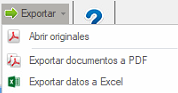
When you select one or more documents and go to Exportar (Export), you will find the following options:
Open originals
Lets you open the selected document or documents directly from their original location.
Export documents to PDF
Lets you save the selected documents in PDF format.
When you select this option, a window will open where you can set:
- Where to save the documents.
- How to save the documents in PDF format.
Export data to Excel
Lets you export to Excel the data linked to the selected documents.
When you select this option, a new window will open to choose where to save the Excel file.
Email documents

The Email option lets you send the selected documents directly from the computer's default email client.
The documents are attached automatically to the email so you can send them.
Print documents

The Imprimir (Print) option lets you send the selected documents directly to the computer's default printer.