
Updated on October 9, 2026
Incorrect country code in the CIF/NIF in Sage
Why Sage assigns the wrong country code to the CIF/NIF and how to fix it.
If an incorrect country code linked to the CIF/NIF appears when working with Ubyquo and Sage, the problem lies in Sage’s internal data: Ubyquo does not assign or change the SiglaNacion (country code) that Sage uses in journal entries.
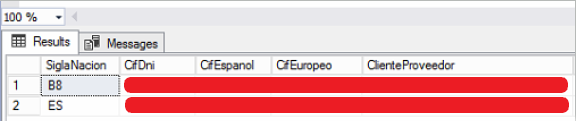
What happens with the SiglaNacion?
Sage takes the SiglaNacion from its internal tables (Proveedores and ClientesProveedores): it looks up the CIF/NIF and, if it has several country codes linked to it, uses the one on line 1. For example:
- Line 1: B8 → incorrect
- Line 2: ES → correct
In this case, Sage will use B8 when generating the journal entries, even though there is a second line with the correct code. Ubyquo plays no part in this assignment during the export.
How to fix the incorrect code
- 1
Check the data in Sage
In Sage, find the affected customer or supplier and check the information for its CIF/NIF: whether there are several country lines and which one is on line 1.
- 2
Contact Sage
If line 1 has an incorrect code, ask Sage support to review and delete the wrong records, especially the incorrect line 1, from these tables:
Proveedores (Suppliers)ClientesProveedores (Customers/Suppliers) Check the fix
Line 1 must have the correct country code. Review or regenerate the affected journal entries if needed and check that Sage uses the correct code.
Important: until Sage’s internal tables are corrected, Sage will keep using the incorrect code from line 1. Exporting again from Ubyquo does not fix the problem, because the SiglaNacion depends on the information stored in Sage.