
Updated on September 23, 2026
Sage VAT pro rata in Ubyquo
Find out how Ubyquo works with Sage's general and special VAT pro rata and what each one requires.
Ubyquo is compatible with the VAT (IVA) pro rata system used in Sage. The configuration you need depends on the type of pro rata the company uses.
Supported types of pro rata
General pro rata
The general pro rata does not require any special configuration in Ubyquo.
Invoices are exported to Sage with 100% of the VAT deductible, and Sage then applies the pro rata percentage configured for the company when it generates the tax forms.
Special pro rata
The special pro rata requires a specific configuration and customization.
To handle this type of pro rata, you need to contact Quantyca's Sales Department.
How the general pro rata works
Exporting invoices from Ubyquo
Invoices are exported from Ubyquo to Sage as if there were no pro rata.
As a result, the invoices appear in Sage with 100% of the VAT deductible.
Applying the pro rata in Sage
When you generate Form 303 (modelo 303) from Impresos Oficiales > Preparación de liquidaciones (Official Forms > Return Preparation), Sage automatically applies the pro rata percentage configured for the company.
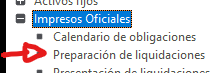
This way, Sage calculates the corresponding deductible VAT according to the pro rata percentage set.
How to check the deductible VAT
You can check the deductible VAT amount in Sage after the general pro rata has been applied:
- Go to Impresos Oficiales > Preparación de liquidaciones > Modelo 303.
- Select the period you want to check.
- Review the accumulated transactions.
- Sage will show the deductible amount after applying the general pro rata percentage.
Required setup in Sage
To use the general pro rata correctly, review the following configuration in Sage.
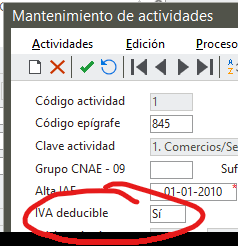
Configure the activities
Each activity must be configured to indicate whether it is deductible:
- Deducible: Sí (Deductible: Yes)
- Deducible: No (Deductible: No)
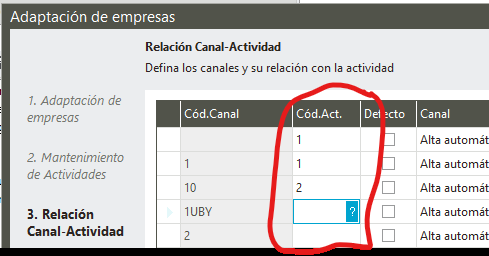
Link channels to activities
If more than one channel is used per activity:
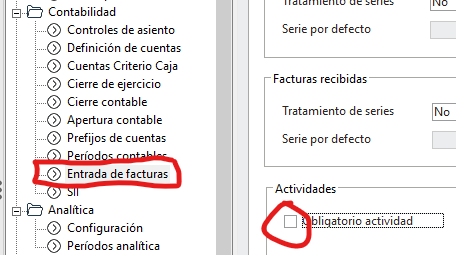
- Go to Asistente de configuración > Contabilidad > Entrada de facturas (Setup wizard > Accounting > Invoice entry).
- Turn on the Obligatorio actividad (Activity mandatory) option.
- Set up the relationship between channels and activities in the form provided.
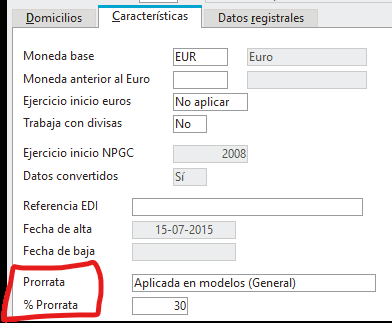
Configure the pro rata
In the company settings:
- Select Prorrata = Aplicada en modelos (General) (Pro rata = Applied in tax forms (General)).
- Define the corresponding pro rata percentage.
Additional setup in Ubyquo
The following configuration requires an Administrator user.
Turn off automatic deduction by activity
- Go to Inicio > Utilidades > Configurar aplicación (Home > Utilities > Configure application).
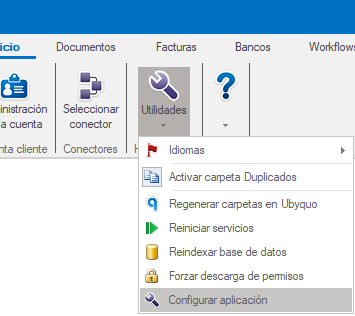
- Uncheck the Actividad deducible (Deductible activity) option.
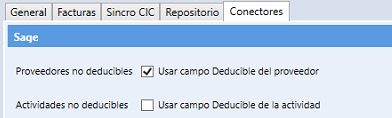
With this configuration, the application of the general pro rata is handled by Sage when it generates the tax forms.
Set the channel as mandatory
This setting is optional and is used if you work with channels in Sage.
- Go to Datos contables > Configuración (Accounting data > Settings).
- Check the Obligatorio informar de canal (Channel mandatory) option.
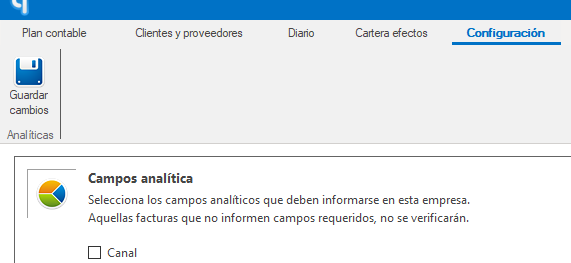
This way, Ubyquo will ask for the channel information when applicable according to the configuration set.