
Updated on October 9, 2026
How do I add invoices in Orders & Delivery Notes?
Manually register a received invoice in Orders & Delivery Notes so you can link and allocate it later.
This is how to manually add an invoice linked to the Orders & Delivery Notes module, with its connector, from the Documents module.
- 1
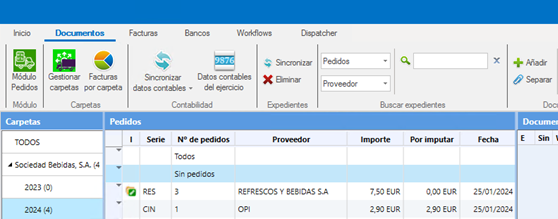
Open the “Sin pedidos” tab
In the Documents module, go to the Sin pedidos (No orders) tab of the fiscal year in which you want to register the invoice.
- 2
Click “Añadir”
Click Añadir (Add), at the top of the screen.
- 3
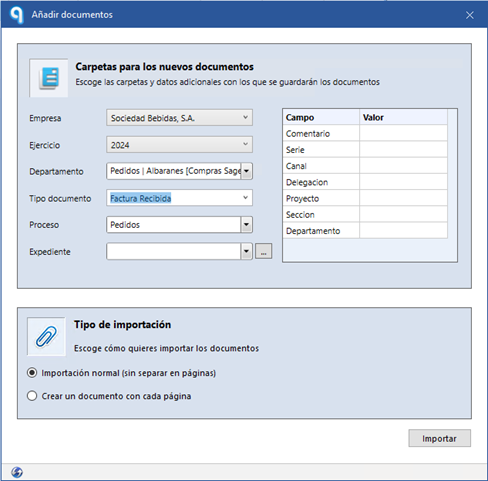
Choose “Factura recibida”
In the pop-up window, choose Factura recibida (Received invoice) as the document type.
- 4
Fill in the details
Fill in the required fields, for example:
SupplierDatesAmounts - 5
Click “Importar”
Click Importar (Import) to add the invoice to the system.
Done! The invoice is now available to link and allocate within the purchasing cycle.