
Updated on November 20, 2026
Invoicing tool sign-up: filling in a new company's details
How to add a company to the Invoicing tool with its tax details and its first financial year.
This option only appears with the Contabilidad [Facturador] master turned on.
Fill in the new company form
- 1
Click «Nueva empresa»
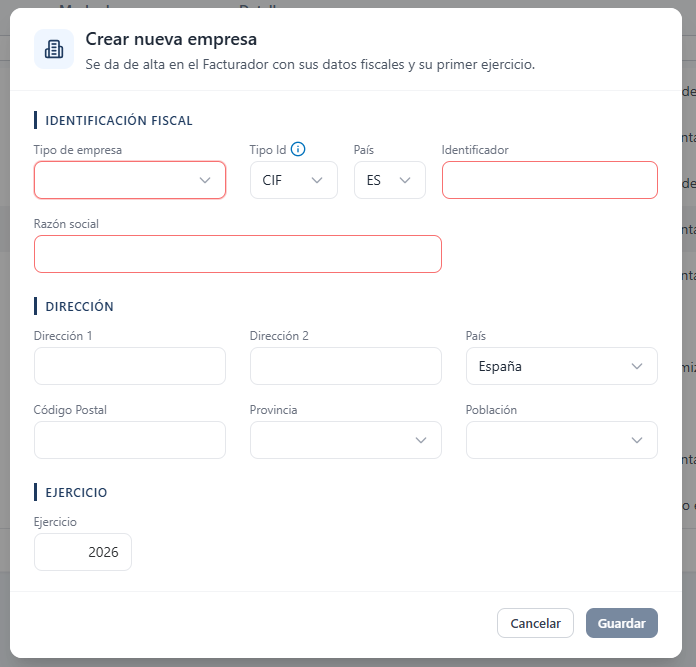
In «Alta en el Facturador» (Invoicing tool sign-up). «Crear nueva empresa» (Create new company) opens, with «CIF» in «Tipo Id» (ID type), Spain as the country and the current year in «Ejercicio» (Financial year). «Guardar» (Save) is disabled.
- 2
Enter the company identifier
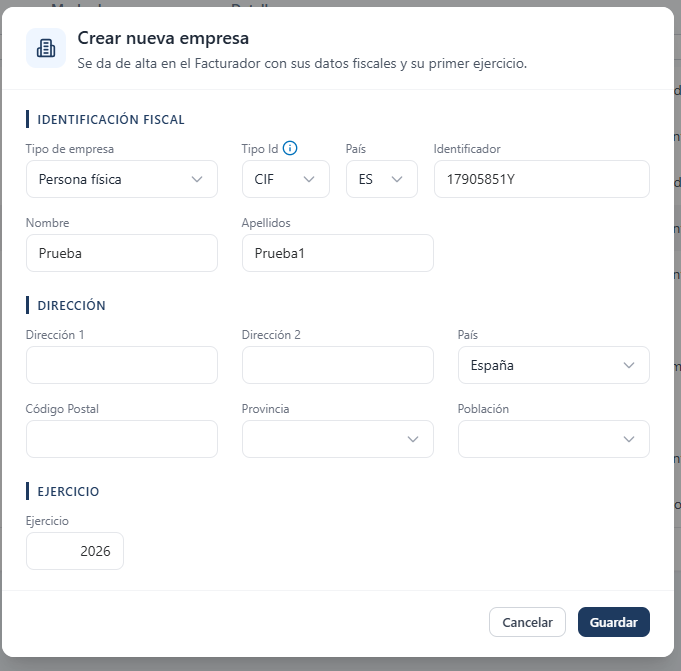
In «Identificación fiscal» (Tax identification), in «Identificador» (Identifier). If it is not valid, the field is marked as wrong and «Guardar» stays disabled. With a valid CIF that starts with a letter, «Tipo de empresa» (Company type) changes by itself to «Persona jurídica» (Legal entity).
- 3
Enter the company name
In «Razón social» (Company name). With the company name and a valid identifier, «Guardar» is enabled (a name made only of spaces does not count). If the company is an individual, the form asks for «Nombre» (First name) and «Apellidos» (Surnames) instead of the company name. You can also fill in the address.
- 4
Change the financial year, if needed
In «Ejercicio». It must be between 2000 and 2050; otherwise «Debe estar comprendido entre 2000 y 2050» (Must be between 2000 and 2050) appears and you cannot save.
- 5
Click «Guardar»
The company is added to the Invoicing tool with its tax details and its first financial year.
Then choose its Anti-Fraud Law mode: Company administration (invoicing tool companies).